
SAP Business One FP 2608: A Big Step Forward for the Web Client
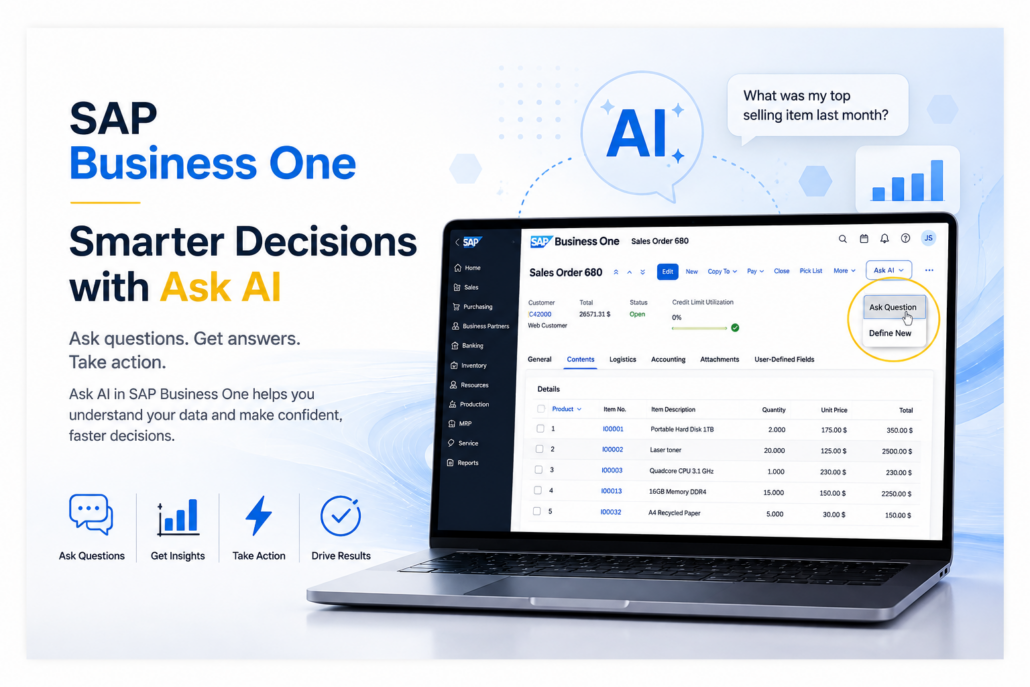
SAP Business One FP 2608: What’s New in Web Client
SAP continues to expand what businesses can accomplish through the SAP Business One Web Client. With SAP Business One FP 2608, that progress takes another significant step forward.
The latest feature package adds new Web Client capabilities across purchasing, inventory, MRP, finance, projects, reporting and other areas. It also introduces something particularly noteworthy: new generative AI capabilities that allow users to interact with SAP Business One data using natural language.
For current SAP Business One users, FP 2608 is more than another software update. It provides another reason to take a fresh look at how much of your everyday SAP Business One work can now be done through a browser.
Watch the Video: What’s New in FP 2608
What Is SAP Business One FP 2608?
SAP Business One 10.0 Feature Package 2608 is the latest feature package in SAP’s continuing development of SAP Business One.
For businesses less familiar with the platform, our complete guide explains what SAP Business One is, how it works and the business functions it brings together.
Feature packages allow SAP to introduce new capabilities and improvements without requiring customers to wait for an entirely new major version of the software.
With SAP Business One FP 2608, much of the attention is on continued expansion of the Web Client.
The Web Client provides browser-based access to SAP Business One functionality with a modern interface designed to work across supported devices. As SAP has continued developing it, more of the processes traditionally performed in the desktop client have become available through the Web Client.
FP 2608 continues that transition.
SAP Business One FP 2608 at a Glance
| Area | What’s New or Expanded |
|---|---|
| Artificial Intelligence | Ask AI and AI-assisted query creation |
| Web Client | More SAP Business One processes available in the browser |
| Purchasing & Inventory | Expanded procurement, inventory and planning functionality |
| Finance | Additional reconciliation, payment and banking capabilities |
| Reporting | More browser-based reporting and data analysis |
| Projects & HR | Expanded project, employee and time-sheet functionality |
| Extensibility | Additional tools for partners and developers |
For a complete list of features and changes, review SAP’s official What’s New in SAP Business One 10.0 FP 2608 documentation.
Why FP 2608 Matters for the SAP Business One Web Client
When the SAP Business One Web Client was first introduced, it didn’t replace everything users could do in the traditional desktop client.
That has been changing steadily.
Each new release has added functionality, making the Web Client practical for more users and more business processes. FP 2608 continues that progression across sales, purchasing, inventory, MRP, accounting, banking, projects, reporting and other areas.
If you’re new to the SAP Business One Web Client or haven’t evaluated it recently, learn more about what the Web Client means for users and the future of ERP.
This matters because Web Client access can give employees greater flexibility in how and where they work with SAP Business One.
For some companies, the question may no longer be:
“Can we use the Web Client?”
Instead, it may be:
“Which of our employees and business processes could benefit from using the Web Client today?”
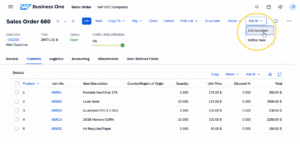
SAP Business One FP 2608 introduces Ask AI in the Web Client, allowing users to ask questions and interact with business data using natural language.
Ask AI Brings Generative AI Into SAP Business One
One of the most interesting additions in SAP Business One FP 2608 is the Ask AI application.
Ask AI allows users to ask questions about selected SAP Business One data using natural language. The capability is integrated with list and detailed views in the Web Client, making AI available within the context of the information users are already working with.
Instead of requiring a user to understand the underlying database structure, the goal is to make interacting with business data more intuitive.
Users can also save questions as templates. With appropriate authorization, templates can be made public so frequently used questions can be shared with other employees.
This is an important development because it shows how AI can become part of everyday ERP use rather than functioning as a completely separate application.
For SAP Business One customers wondering how AI may eventually affect their ERP system, FP 2608 provides a much more concrete answer.
See Ask AI in action: Watch SAP demonstrate how SAP Business One users can ask business questions in natural language and get insights from their data.
For a broader look at where this technology is heading, read AI in SAP Business One: What It Means for the Future of ERP.
Create SAP Business One Queries Using Natural Language
Another significant AI capability in FP 2608 is assistance with creating User-Defined Queries.
User-Defined Queries can be extremely valuable in SAP Business One, but creating them traditionally requires knowledge of the SAP Business One database and SQL.
AI can help reduce that technical barrier.
A user can describe the information they want using natural language, and the AI assistant can use the SAP Business One database schema to help generate an SQL SELECT statement.
For example, a business user might want information such as:
Which customers have overdue invoices greater than $10,000?
Instead of starting by identifying database tables and fields and manually constructing the query, AI can help translate the business question into the underlying query.
That doesn’t eliminate the need for good data, security, permissions or appropriate review. However, it can make SAP Business One data considerably more accessible to people who understand the business question but aren’t SQL experts.
More Business Processes Are Moving to the Web Client
AI may get the headlines, but some of the most useful FP 2608 improvements are simply the continued expansion of everyday SAP Business One functionality in the Web Client.
FP 2608 adds or enhances capabilities in areas including:
- Sales and purchasing
- Purchase quotation generation
- Inventory and warehouse management
- Material Requirements Planning (MRP)
- Inventory revaluation
- Internal reconciliation
- Payment processing
- Check management
- Banking and external reconciliation
- Project management
- Employee information and time sheets
- Reporting and analytics
- User-defined objects
- Web Client extensibility
The importance of these additions will vary considerably from one company to another.
A distributor may be particularly interested in inventory, warehouse and purchasing functionality. A manufacturer may focus on MRP and planning. Finance teams may benefit more from expanded payment, banking and reconciliation capabilities.
The larger story is that SAP continues to reduce the number of processes that require users to return to the traditional desktop client.
What Does FP 2608 Mean for Current SAP Business One Users?
A new feature package doesn’t mean every SAP Business One customer should immediately change how they work.
It does mean that it may be worth reviewing what has changed.
Companies that evaluated the SAP Business One Web Client a year or two ago may have decided that it didn’t yet contain enough functionality for their needs. That conclusion may no longer be accurate.
The same applies to AI.
Many businesses have been hearing about AI in ERP systems without seeing many practical examples that directly affect their daily work. Ask AI and AI-assisted query creation begin moving the conversation from theoretical AI capabilities toward practical tools inside SAP Business One.
However, taking advantage of new functionality should still be approached carefully.
Before implementing new FP 2608 capabilities, businesses should consider their current SAP Business One version, database environment, integrations, add-ons, customizations, user permissions and existing business processes.
AI also makes data quality increasingly important. Giving users easier ways to ask questions about ERP data is valuable only when the underlying information is accurate, consistent and properly governed.
Learn why clean ERP data is the foundation for successful AI and automation in SAP Business One.
Is It Time to Take Another Look at the SAP Business One Web Client?
If you haven’t looked at the SAP Business One Web Client recently, FP 2608 provides a good reason to revisit it.
The Web Client has evolved considerably, and SAP continues adding functionality that allows more employees to complete everyday work through a modern browser-based interface.
The addition of generative AI makes FP 2608 particularly interesting. Ask AI and AI-assisted query creation demonstrate how SAP is beginning to make AI part of the way users interact with Business One data.
That doesn’t mean every new feature is appropriate for every organization.
The important question is which new capabilities can help your business operate more efficiently, give employees better access to information and get more value from SAP Business One.
At Support One, we help SAP Business One customers evaluate new functionality, understand how it fits with their existing environment and determine which improvements are worth implementing.
If you’re interested in FP 2608, the SAP Business One Web Client or how new AI capabilities could apply to your organization, contact Support One. We’ll help you separate the features that are genuinely useful for your business from those you may not need yet.

Want to learn more about FP 2608? Let’s Chat
