
EDI Integration for SAP Business One
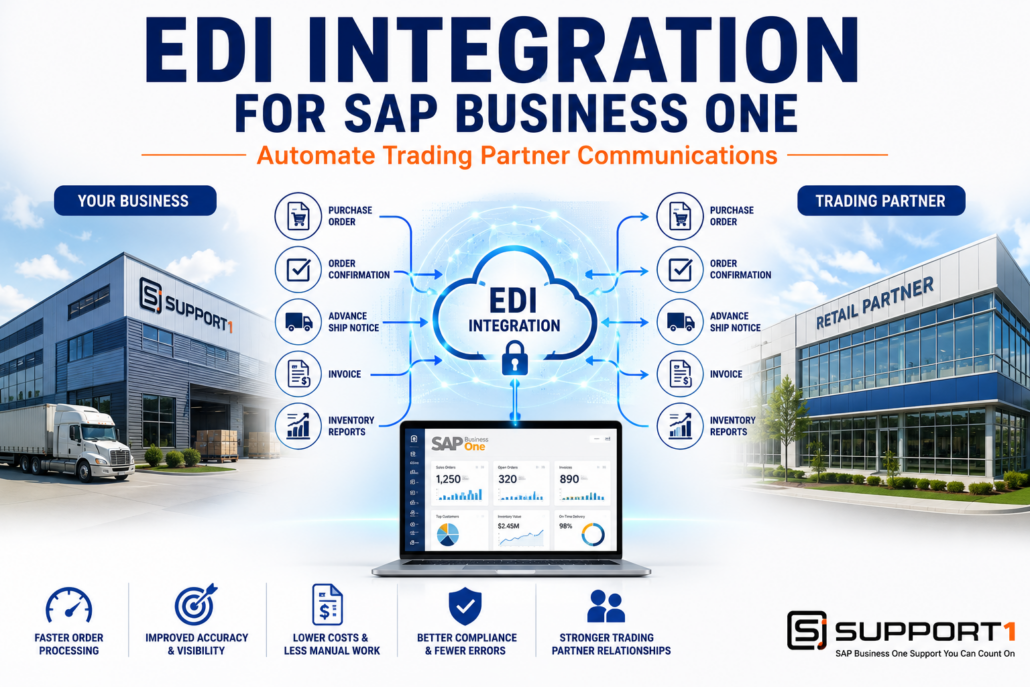
EDI Integration for SAP Business One: Automate Trading Partner Communications
EDI Integration for SAP Business One helps manufacturers, distributors, and suppliers automate the exchange of business documents with customers and trading partners. Many businesses still process purchase orders, invoices, shipping notices, and other documents manually through email, PDFs, or spreadsheets. These manual processes consume valuable time, increase the risk of errors, and often fail to meet the electronic requirements of major retailers and business partners.
By integrating Electronic Data Interchange (EDI) with SAP Business One, businesses can automatically exchange purchase orders, invoices, shipping notifications, and other critical documents directly with trading partners. The result is faster order processing, improved supply chain visibility, reduced administrative costs, and stronger customer relationships.
What Is EDI Integration for SAP Business One?
Electronic Data Interchange (EDI) is the electronic exchange of standardized business documents between companies. Instead of manually entering information into multiple systems, EDI allows computers to exchange data automatically in standardized formats.
Common EDI documents include:
- Purchase Orders (850)
- Purchase Order Acknowledgments (855)
- Advance Ship Notices (856)
- Invoices (810)
- Inventory Reports
- Shipping Documents
- Payment Information
Industries that commonly rely on EDI include:
- Manufacturing
- Wholesale Distribution
- Retail
- Food & Beverage
- Automotive
- Healthcare
When integrated with SAP Business One, EDI eliminates duplicate data entry while improving the speed and accuracy of communications with customers and suppliers.
Review the: GS1 US EDI Standards
Related Reading: The Real ROI of SAP Business One Integrations
EDI Integration for SAP Business One automates trading partner communications by exchanging purchase orders, invoices, shipping notices, and other business documents electronically, helping businesses improve efficiency, reduce costs, strengthen compliance, and streamline the order-to-cash process.
Why Manual Trading Partner Communication Creates Problems
Many organizations still rely on email, spreadsheets, or paper documents to exchange information with customers and suppliers.
This often results in:
- Duplicate data entry
- Order processing delays
- Invoice errors
- Shipping mistakes
- Customer chargebacks
- Missed compliance requirements
- Increased administrative costs
- Poor visibility into order status
As order volume grows, these inefficiencies become more difficult and expensive to manage.
1. Automate Purchase Order Processing
One of the greatest benefits of EDI is automatically importing customer purchase orders into SAP Business One.
Instead of manually entering orders, businesses can:
- Receive orders electronically
- Validate customer information
- Create sales orders automatically
- Reduce order entry errors
- Process orders faster
Automated order processing improves efficiency while allowing employees to focus on higher-value activities.
Related Reading: SAP Business One Automation: Save Time, Reduce Costs, and Improve Efficiency
2. Improve Supply Chain Visibility
EDI provides real-time visibility into transactions throughout the supply chain.
Businesses gain better insight into:
- Incoming purchase orders
- Inventory availability
- Shipment status
- Order confirmations
- Customer requirements
Improved visibility helps companies make better purchasing, production, and inventory decisions.
Related Reading: SAP Business One WMS: Improve Warehouse Efficiency and ROI
Trading partner communications generate valuable operational data that Business Intelligence for SAP Business One transforms into dashboards for monitoring order volume, fulfillment performance, and supply chain efficiency.
3. Reduce Shipping Errors
Shipping mistakes often occur when warehouse employees manually prepare shipping documents or re-enter customer information.
EDI automates the exchange of:
- Advance Ship Notices (ASNs)
- Shipment confirmations
- Tracking information
- Carrier details
- Delivery updates
Combined with barcode scanning and shipping integration, EDI creates a more accurate and efficient fulfillment process.
Related Reading: Shipping Integration for SAP Business One: Automate Shipping and Improve Fulfillment
Related Reading: SAP Business One Barcode Scanning: Improve Accuracy and Productivity
4. Improve Customer Satisfaction
Large customers expect timely communication throughout the order fulfillment process.
EDI helps businesses provide:
- Faster order confirmations
- Accurate invoices
- Timely shipping notifications
- Improved communication
- Greater order accuracy
Meeting customer EDI requirements also strengthens long-term business relationships and reduces costly disputes.
Related Reading: CRM Integration for SAP Business One: Improve Sales and Customer Relationships
5. Reduce Administrative Costs
Manual document processing requires significant administrative effort.
EDI automates many repetitive tasks, including:
- Purchase order processing
- Invoice delivery
- Shipping documentation
- Order acknowledgments
- Trading partner communications
Reducing manual processing lowers labor costs while minimizing human error.
Related Reading: AP Automation for SAP Business One: Reduce Costs and Eliminate Manual Processing
6. Improve Trading Partner Compliance
Many retailers, distributors, and manufacturers require suppliers to exchange documents electronically.
Examples include organizations that do business with major retailers or enterprise customers that require standardized EDI communications.
Businesses that fail to meet these requirements may experience:
- Chargebacks
- Delayed payments
- Shipment delays
- Compliance penalties
- Lost business opportunities
An integrated EDI solution helps ensure business documents meet customer requirements while improving consistency and reliability.
EDI Integration for SAP Business One Is Part of a Complete ERP Strategy
EDI is most effective when integrated with the rest of your business systems. Purchase orders received through EDI can automatically create sales orders in SAP Business One, trigger warehouse picking, update inventory through barcode scanning, generate shipping labels, send Advance Ship Notices, process customer invoices, and update CRM records.
By connecting EDI with warehouse management, shipping integration, payment processing, automation, and customer relationship management, businesses create a fully integrated order-to-cash process that reduces manual work while improving visibility across the organization.
Businesses exchanging documents electronically can stay connected even while traveling. Mobile ERP for SAP Business One provides secure access to orders, shipments, and trading partner information from mobile devices.
Choosing the Right EDI Integration for SAP Business One
Not every EDI solution offers the same functionality.
When evaluating an EDI platform, consider:
- Native SAP Business One integration
- Trading partner support
- Standard document mapping
- Automated error handling
- Cloud connectivity
- Scalability
- Compliance management
- Reporting capabilities
- Ongoing support
Cloud-based EDI providers such as SPS Commerce help businesses connect with thousands of retailers, distributors, and trading partners through standardized electronic document exchange.
Solutions like TrueCommerce provide scalable EDI platforms that integrate with ERP systems to automate purchase orders, invoices, shipping notices, and other trading partner communications.
If your business is running an older version of SAP Business One, it may also be worth evaluating an ERP upgrade to ensure compatibility with modern EDI platforms and future business requirements.
Related Reading: ERP Upgrade Problems: Causes and Solutions
Related Reading: How to Choose the Right SAP Business One Support Partner
Conclusion: Why EDI Integration for SAP Business One Delivers ROI
Manual trading partner communication slows business processes, increases costs, and creates unnecessary administrative work.
EDI Integration for SAP Business One automates purchase orders, invoices, shipping notifications, and other business documents, helping organizations reduce manual processing, improve supply chain visibility, strengthen customer relationships, and maintain compliance with trading partner requirements.
Whether your business exchanges hundreds or thousands of documents each month, integrating EDI with SAP Business One can improve operational efficiency while delivering measurable long-term ROI.
Ready to Automate Trading Partner Communications?
Support One helps manufacturers, distributors, and suppliers implement EDI solutions that integrate seamlessly with SAP Business One. Whether you’re connecting with a new trading partner or modernizing an existing EDI process, our team can help you simplify document exchange, improve compliance, and maximize your ERP investment.
Learn Why Businesses Are Choosing Support One for SAP Business One Support and discover how we help organizations optimize supply chain communications and business integrations.
Schedule an EDI Integration Consultation to learn how EDI Integration for SAP Business One can streamline operations, reduce costs, and support future business growth.

Let’s talk about EDI Integrations for SAP Business One

