
SAP Business One Automation: Save Time & Reduce Costs
SAP Business One Automation: Save Time, Reduce Costs, and Improve Efficiency
SAP Business One Automation helps businesses save time, reduce costs, and improve efficiency by eliminating repetitive manual processes. As organizations grow, tasks like entering sales orders, approving purchase requests, updating inventory, and processing invoices can become bottlenecks that slow productivity and increase operating costs. Automating these routine workflows allows employees to focus on serving customers and growing the business.
From entering sales orders and approving purchase requests to updating inventory and processing invoices, repetitive tasks consume valuable employee time that could be better spent serving customers and growing the business.
SAP Business One automation helps companies streamline routine processes by reducing manual effort, improving accuracy, and providing real-time visibility across the organization. Whether you’re a manufacturer, distributor, wholesaler, or service organization, automating key business processes can help save time, reduce costs, and improve overall efficiency.
What Is SAP Business One Automation?
SAP Business One automation uses workflows, integrations, alerts, approvals, and intelligent business processes to reduce manual tasks throughout your organization.
Businesses using SAP Business One can automate routine processes across sales, purchasing, inventory, finance, and customer service while maintaining a single source of accurate business information.
Instead of relying on paper forms, spreadsheets, emails, or duplicate data entry, automated workflows move information between departments and systems in real time.
Examples include:
- Sales order processing
- Purchase order approvals
- Inventory replenishment
- Customer notifications
- Invoice generation
- Field service scheduling
- Warehouse transactions
- Workflow approvals
- Business alerts
- Reporting and dashboards
Automation doesn’t replace employees—it allows them to focus on higher-value work that requires experience, customer interaction, and decision-making.
Many automation initiatives depend on SAP Business One integrations that connect warehouse systems, field service applications, eCommerce platforms, shipping software, and CRM solutions.
Many organizations beginning their automation journey have common SAP Business One support questions about workflows, integrations, upgrades, and system capabilities.
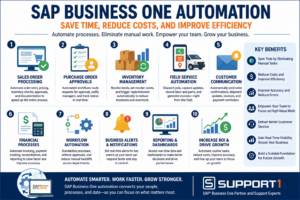
SAP Business One Automation streamlines workflows, eliminates repetitive manual tasks, and helps businesses save time, reduce costs, and improve operational efficiency across sales, finance, inventory, warehouse, and field service operations.
Why Businesses Are Investing in SAP Business One Automation
Many organizations delay automation because their existing processes “still work.”
The problem is that manual processes become increasingly expensive as businesses grow.
Common challenges include:
- Duplicate data entry
- Approval bottlenecks
- Delayed customer responses
- Inventory inaccuracies
- Manual reporting
- Paper-based workflows
- Slow invoicing
- Limited operational visibility
Automating these processes improves consistency while allowing employees to spend more time on activities that directly support customers and business growth.
Where SAP Business One Automation Delivers the Greatest Value
1. Automate Sales Order Processing
Sales teams often spend unnecessary time entering orders, checking inventory, confirming pricing, and communicating with accounting or warehouse personnel.
Automation helps by:
- Validating customer information
- Checking inventory availability
- Applying pricing rules
- Routing approvals
- Creating shipping documents
- Updating inventory automatically
Sales orders move through the business faster while reducing manual errors.
eCommerce Integration for SAP Business One extends automation beyond internal operations by automatically processing online orders, updating inventory, and eliminating duplicate order entry.
EDI Integration for SAP Business One extends automation beyond your organization by exchanging purchase orders, invoices, and shipping notices electronically with customers and suppliers, eliminating repetitive manual processing.
2. Improve Purchase Order Approvals
Many purchasing departments still depend on emails or paper approvals.
Automated approval workflows allow managers to:
- Review requests electronically
- Approve purchases remotely
- Receive approval notifications
- Track approval status
- Maintain audit trails
Approvals happen faster while improving accountability.
3. Streamline Inventory Management
Inventory errors affect purchasing, production, customer service, and profitability.
SAP Business One automation helps businesses:
- Monitor inventory levels
- Trigger replenishment recommendations
- Reduce stock shortages
- Prevent overstocking
- Improve inventory accuracy
Organizations using warehouse management solutions can further improve warehouse operations through automated barcode scanning and real-time inventory updates.
Related Reading: SAP Business One WMS: Improve Warehouse Efficiency and ROI
One of the most practical examples of warehouse automation is SAP Business One Barcode Scanning, which eliminates paper-based inventory transactions while improving accuracy and employee productivity.
4. Automate Field Service Operations
Mobile employees generate valuable business information every day.
Instead of completing paperwork after returning to the office, automation allows technicians and sales representatives to:
- Receive digital work orders
- Update job status in real time
- Record labor and parts used
- Create quotations
- Convert quotes into sales orders
- Capture customer signatures
- Generate invoices more quickly
This improves customer service while reducing administrative work.
Related Reading: SAP Business One Field Service: Improve Productivity and Customer Satisfaction
5. Improve Customer Communication
Customers appreciate timely communication throughout the buying process.
Automation can send notifications when:
- Orders are confirmed
- Shipments are dispatched
- Service appointments are scheduled
- Invoices are generated
- Payments are received
Keeping customers informed improves their overall experience while reducing inbound support calls.
CRM Integration for SAP Business One extends automation into the sales process by automatically synchronizing customer information, opportunities, and sales orders, eliminating duplicate data entry while improving collaboration.
6. Automate Financial Processes
Accounting departments often spend hours processing invoices, reconciling information, and preparing reports.
Automation helps:
- Generate invoices faster
- Reduce manual data entry
- Improve payment tracking
- Simplify approvals
- Produce financial reports more efficiently
The result is faster month-end closing and better financial visibility.
A great example of business process automation is AP Automation for SAP Business One, which replaces manual invoice entry and approval workflows with faster, more accurate digital processes.
Another excellent example of automation is Payment Processing for SAP Business One, which records customer payments automatically, simplifies reconciliation, and reduces administrative work for accounting teams.
Read More: Benefits of Automating Accounts Payable Processing
7. Create Better Business Insights
Automation captures data consistently across the organization.
Managers gain access to real-time dashboards that help monitor:
- Sales performance
- Inventory levels
- Purchasing activity
- Customer service metrics
- Technician productivity
- Operational efficiency
Accurate, real-time information supports faster and more informed business decisions.
Workflow automation becomes even more effective when documents are automatically stored and organized. Document Management for SAP Business One reduces manual filing while keeping business records securely connected to ERP transactions.
Automation and AI: Better Together
Automation and artificial intelligence are closely related—but they are not the same.
Automation follows predefined business rules to complete repetitive tasks.
AI analyzes data, identifies patterns, predicts outcomes, and helps users make better decisions.
For example:
- Automation routes purchase approvals automatically.
- AI may recommend the best time to reorder inventory.
- Automation creates customer invoices.
- AI identifies customers who may be at risk of leaving.
- Automation updates inventory after a shipment.
- AI forecasts future inventory demand.
The more automated your business processes become, the more accurate data AI has available to deliver valuable insights.
Related Reading: What AI Features in ERP actually deliver ROI?
Automation removes repetitive work, while AI adds intelligence to business decisions. Learn how both technologies contribute to growth in How AI Helps SAP Business One Users Increase Revenue and Profit.
Should You Upgrade SAP Business One Before Automating Your Workflows?
Many companies assume they need new software to automate their operations.
However, businesses running older versions of SAP Business One may already have access to features that support automation after upgrading to a current release.
Before investing in additional software, consider:
- Can existing SAP Business One functionality meet your needs?
- Would an upgrade improve automation capabilities?
- Do you need an integrated third-party solution?
- Which manual processes create the biggest bottlenecks?
Working with an experienced SAP Business One partner can help determine the most cost-effective solution. Before investing in new software or automation tools, it’s important to evaluate your current environment with an experienced partner. Here’s what to consider when choosing the right SAP Business One support partner.
Related Reading: ERP Upgrade Problems: Causes and Solutions
Choosing the Right SAP Business One Automation Strategy
Successful automation projects begin with understanding your business processes.
Rather than automating everything at once, focus on the areas that provide the fastest return on investment.
Many organizations begin with:
- Sales order processing
- Purchasing approvals
- Warehouse operations
- Field service management
- Customer communications
- Financial reporting
As your business grows, additional automation opportunities can be introduced without disrupting daily operations.
Businesses evaluating automation capabilities should also review the official SAP Business One documentation to understand available features and compatibility with their current version.
Conclusion: Build a More Efficient Business with SAP Business One Automation
Automation is no longer just a competitive advantage—it’s becoming a business necessity.
By eliminating repetitive manual tasks, improving data accuracy, and connecting departments through real-time information, SAP Business One automation helps organizations operate more efficiently, improve ROI and provide better customer service.
Whether your goal is reducing administrative work, improving warehouse operations, empowering mobile employees, or preparing for AI-driven business insights, automation provides the foundation for long-term growth.
The result is a more productive workforce, lower operating costs, and a stronger return on your ERP investment.
Organizations looking to expand their automation initiatives can also explore business process automation best practices to identify additional opportunities for improving operational performance.
Automation generates valuable operational data. Business Intelligence for SAP Business One helps organizations analyze that information through real-time dashboards that support continuous improvement and smarter decision-making.
Automated workflows don’t need to stop when employees leave the office. Mobile ERP for SAP Business One enables managers to review approvals and monitor automated processes from virtually anywhere.
Ready to Automate Your Business Processes?
Support One helps businesses identify opportunities to automate routine processes using SAP Business One and integrated business solutions. Whether you’re looking to streamline warehouse operations, improve field service, automate approvals, or prepare for AI-powered decision-making, our team can help you develop the right automation strategy.
Successfully automating business processes requires more than software—it requires the right implementation strategy and ongoing support. Learn Why Businesses Choose Support One for SAP Business One consulting, optimization, and long-term support.
Schedule an Automation Assessment to discover how SAP Business One automation can save time, reduce costs, and improve efficiency across your organization.

Questions about SAP B1 Automations? Let’s talk.

