
Payment Processing for SAP Business One
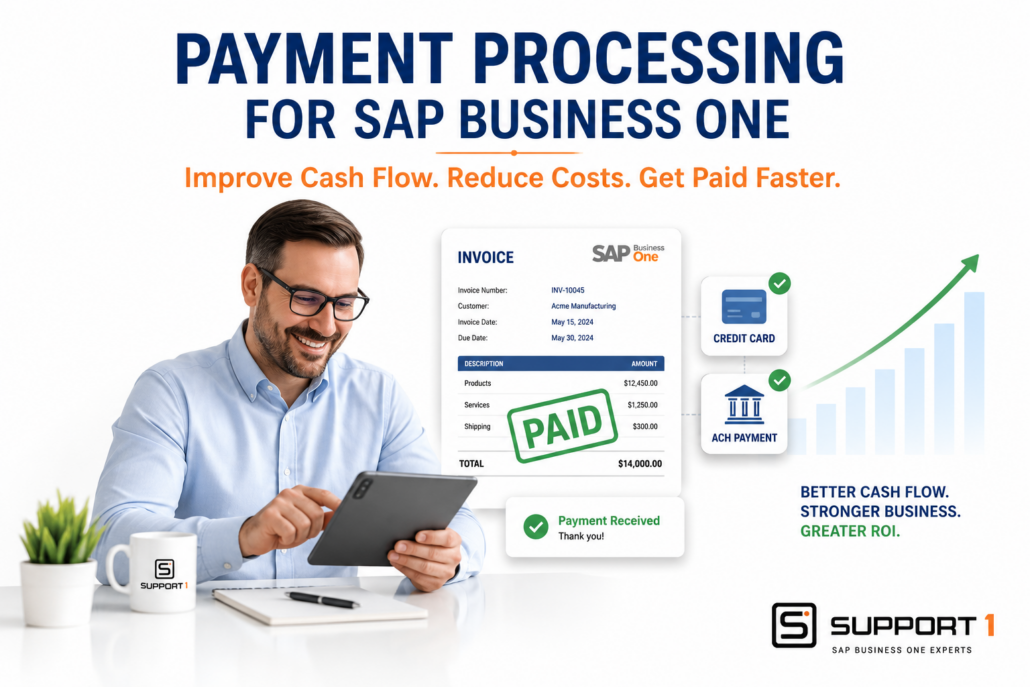
Payment Processing for SAP Business One: Improve Cash Flow and Reduce Costs
Payment Processing for SAP Business One helps businesses improve cash flow, reduce payment processing costs, and eliminate manual receivables by integrating customer payments directly with their ERP system. Many organizations still process payments manually, requiring employees to enter payment information, reconcile deposits, and update customer accounts separately, creating unnecessary delays and increasing the risk of errors.
By integrating payment processing with SAP Business One, businesses can automate payment acceptance, simplify reconciliation, and provide customers with secure, convenient payment options. The result is faster collections, improved financial visibility, lower administrative costs, and a stronger return on your ERP investment.
What Is Payment Processing for SAP Business One?
Payment Processing for SAP Business One integrates credit card, ACH, and electronic payment processing directly with your ERP system.
Instead of processing payments separately and manually updating accounting records, integrated payment solutions automatically record customer payments, update invoices, reconcile transactions, and improve cash flow visibility.
A typical payment workflow includes:
- Customer invoice is created
- Customer submits payment
- Credit card or ACH transaction is processed
- SAP Business One automatically records the payment
- Customer account is updated
- Financial reports are updated in real time
Integrated payment processing eliminates duplicate data entry while giving finance teams immediate access to accurate financial information.
Organizations that accept credit card payments should follow PCI Security Standards to help protect sensitive payment information and maintain compliance.
Businesses looking to expand electronic payment options can also review ACH payment best practices to improve payment efficiency and support faster cash collections.
Related Reading: The Real ROI of SAP Business One Integrations
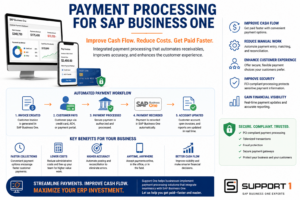
Payment Processing for SAP Business One automates customer payments, improves cash flow, reduces manual processing, strengthens payment security, and provides real-time financial visibility.
Why Payment Processing for SAP Business One Matters
Many businesses continue to rely on disconnected payment systems that require accounting staff to manually process customer payments.
Common challenges include:
- Manual payment entry
- Delayed cash application
- Duplicate data entry
- Time-consuming bank reconciliation
- Payment posting errors
- Limited payment options
- Slow collections
- Increased administrative costs
As payment volumes increase, these manual processes become more difficult to manage and negatively affect customer satisfaction and cash flow.
1. Improve Cash Flow
One of the greatest benefits of integrated payment processing is getting paid faster.
Providing customers with multiple payment options encourages faster payment while reducing outstanding receivables.
Common payment methods include:
- Credit cards
- ACH transfers
- Secure online payment links
- Customer payment portals
- Mobile payments
The faster invoices are paid, the healthier your cash flow becomes.
Related Reading: SAP Business One ROI: 10 Ways to Increase Profitability
Integrated payment processing generates valuable financial data that Business Intelligence for SAP Business One transforms into dashboards for monitoring revenue, cash flow, customer payments, and overall financial performance.
2. Reduce Manual Processing
Without integration, accounting departments often spend valuable time:
- Entering customer payments
- Matching deposits
- Updating customer balances
- Reconciling merchant transactions
- Correcting payment errors
Integrated payment processing automates these repetitive tasks, allowing finance teams to focus on more strategic activities.
Related Reading: SAP Business One Automation: Save Time, Reduce Costs, and Improve Efficiency
Integrating eCommerce Integration for SAP Business One with payment processing creates a seamless order-to-cash workflow, automatically synchronizing customer orders, payments, inventory, and financial records.
3. Improve the Customer Payment Experience
Today’s customers expect convenient, secure payment options.
Integrated payment processing allows businesses to offer:
- Credit card payments
- ACH payments
- Online payment portals
- Email payment links
- Mobile payment options
Making it easier for customers to pay improves satisfaction while reducing collection efforts.
Additionally, combining CRM Integration for SAP Business One with integrated payment processing provides sales and accounting teams with complete visibility into customer orders, invoices, payments, and account status.
4. Increase Financial Accuracy
When payments are processed directly through SAP Business One, accounting records remain accurate and up to date.
Automatic updates include:
- Customer balances
- Open invoices
- Cash receipts
- Payment history
- Financial reports
Eliminating manual entry reduces errors while improving financial visibility.
Payment records are even more valuable when connected to supporting documentation. Document Management for SAP Business One securely stores invoices, receipts, and financial records alongside ERP transactions for faster retrieval and improved auditing.
Financial information is even more valuable when it’s available outside the office. Mobile ERP for SAP Business One provides secure access to payment activity, dashboards, and financial information wherever business takes place.
5. Improve Security and Compliance
Handling payment information manually increases business risk.
Modern payment processing solutions provide:
- Secure payment gateways
- PCI-compliant processing
- Tokenized payment information
- Fraud protection
- Reduced handling of sensitive financial data
These safeguards help businesses protect customer information while reducing compliance concerns.
6. Simplify Reconciliation
Reconciling payment transactions manually is often one of the most time-consuming accounting tasks.
Integrated payment processing automatically matches:
- Customer payments
- Bank deposits
- Merchant settlements
- Open invoices
- General ledger transactions
This simplifies month-end closing while improving accounting accuracy.
7. Support Sales and Field Service Teams
Integrated payment processing isn’t limited to the accounting department.
Sales representatives and field service technicians can:
- Accept payments on-site
- Email secure payment links
- Collect deposits
- Close invoices immediately
- Update customer accounts in real time
This improves customer service while accelerating cash collections.
Related Reading: Field Service Management Integration: Improving Efficiency and Profitability
Payment Processing for SAP Business One Is Part of a Complete ERP Strategy
The greatest return on investment comes when payment processing is integrated into a broader ERP automation strategy. Connecting customer payments with warehouse operations, AP automation, barcode scanning, field service, and reporting creates a more efficient business where information flows automatically between departments. The result is fewer manual processes, improved financial visibility, faster decision-making, and a better customer experience.
Businesses investing in automation often combine integrated payment processing with SAP Business One Barcode Scanning, AP Automation for SAP Business One, and broader SAP Business One Automation initiatives to maximize efficiency throughout the organization.
EDI Integration for SAP Business One works alongside integrated payment processing by electronically exchanging invoices and other business documents, helping accelerate the order-to-cash cycle.
Once customer payments are processed, Shipping Integration for SAP Business One helps complete the order lifecycle by automating shipment preparation, tracking, and delivery notifications.
Connecting transactions directly with ERP workflows can save time, reduce errors, and improve visibility.
Payment Processing and AI
Artificial intelligence is beginning to improve payment processing by helping businesses:
- Predict customer payment behavior
- Identify collection risks
- Detect unusual payment activity
- Improve cash flow forecasting
- Recommend collection priorities
As AI capabilities continue to evolve, businesses with integrated payment processing will be better positioned to take advantage of these advanced financial insights.
Related Reading: What AI Features in ERP Actually Deliver ROI?
Choosing the Right Payment Processing Solution for SAP Business One
Not every payment solution offers the same capabilities.
When evaluating payment processing software, consider:
- Native SAP Business One integration
- Credit card and ACH support
- Secure payment gateways
- PCI compliance
- Customer payment portals
- Mobile payment capabilities
- Reporting and dashboards
- Ease of implementation
- Ongoing support
Working with an experienced SAP Business One partner helps ensure your payment processing solution supports both your current needs and future business growth.
If your organization is running an older version of SAP Business One, it may also be worth evaluating whether an upgrade should be part of your automation strategy. Newer releases often improve integration capabilities, security, and compatibility with modern payment processing solutions. Learn more about ERP Upgrade Problems and how they can affect future technology investments.
Related Reading: How to Choose the Right SAP Business One Support Partner
Conclusion: Why Payment Processing for SAP Business One Delivers ROI
Manual payment processing slows cash collections, increases administrative work, and creates unnecessary opportunities for errors.
Payment Processing for SAP Business One improves cash flow by automating receivables, reducing manual processing, simplifying reconciliation, and providing customers with secure, convenient payment options.
Whether your goal is improving financial efficiency, accelerating collections, or supporting long-term business growth, integrated payment processing delivers measurable value while helping maximize your ERP investment.
Ready to Improve Cash Flow and Simplify Customer Payments?
Support One helps businesses evaluate payment processing solutions that integrate seamlessly with SAP Business One. Whether you’re looking to automate receivables, improve customer payment experiences, or reduce administrative costs, our team can help identify the right solution for your business.
Learn Why Businesses Are Choosing Support One for SAP Business One Support and discover how we help organizations optimize business processes, improve financial performance, and maximize the value of their ERP investment.
Schedule a Payment Processing Consultation to learn how integrated payment processing can improve cash flow, reduce manual work, and support long-term business growth.

Let’s talk about Payment Processing solutions for SAP Business One

