
SAP Business One Field Service: Improve Productivity

SAP Business One Field Service solutions help manufacturers, distributors, and service organizations connect their mobile workforce with real-time ERP data. Whether employees are service technicians, installation crews, sales representatives, or delivery personnel, giving them secure access to customer information, inventory, pricing, and work orders improves productivity and customer satisfaction.
Without real-time access to customer records, inventory availability, pricing, or work orders, employees often rely on phone calls, paper forms, spreadsheets, or delayed data entry. These manual processes slow productivity, increase errors, and reduce customer satisfaction.
SAP Business One Field Service solutions extend your ERP system beyond the office, giving mobile employees secure access to the information they need—wherever they are. By connecting field personnel directly to SAP Business One, businesses can improve efficiency, respond faster to customer needs, and increase the return on their ERP investment.
What Is SAP Business One Field Service?
Field service management (FSM) is the process of coordinating employees who work outside the office. This includes scheduling, dispatching, managing work orders, tracking inventory, recording labor, and communicating with customers.
When integrated with SAP Business One, a field service solution provides real-time access to critical business information while automatically updating the ERP system as work is completed.
Typical capabilities include:
- Mobile access to customer information
- Service call and work order management
- Scheduling and dispatching
- Real-time inventory visibility
- Quotation and sales order creation
- Time and expense tracking
- Electronic signatures
- Photo and document attachments
- Faster invoicing
Instead of waiting until employees return to the office, information is captured once and immediately becomes available throughout the organization.
Businesses using SAP Business One can extend their ERP system with field service solutions that provide mobile access to customer, inventory, and service information.
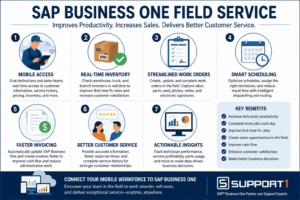
SAP Business One Field Service connects mobile employees with real-time ERP data, helping businesses improve productivity, increase sales opportunities, streamline service operations, and deliver exceptional customer service.
Common Challenges Without SAP Business One Field Service
Many growing businesses still depend on manual processes for employees working in the field.
Common problems include:
- Paper work orders
- Duplicate data entry
- Limited visibility into technician activities
- Delayed invoicing
- Inaccurate inventory information
- Difficulty scheduling service calls
- Employees calling the office for pricing or inventory availability
These inefficiencies not only increase operating costs but also affect the customer experience.
How SAP Business One Field Service Improves Operations
A properly integrated field service solution connects your mobile workforce directly to SAP Business One, improving communication and reducing administrative work.
Businesses evaluating mobile solutions should also review the official SAP Business One documentation to understand available functionality and compatibility with their current version.
The following areas often deliver the greatest return.
1. Give Mobile Employees Real-Time Access to Business Information
Whether employees are repairing equipment, installing products, or meeting with prospective customers, they need immediate access to accurate information.
With SAP Business One Field Service, mobile employees can view:
- Customer account information
- Contact details
- Service history
- Open sales orders
- Previous invoices
- Equipment records
- Product availability
- Pricing information
Having this information available before arriving at a customer site allows employees to resolve issues more quickly while providing a more professional customer experience.
Mobile employees become even more productive when automated business processes eliminate manual paperwork, accelerate approvals, and synchronize information with SAP Business One in real time.
Businesses can extend eCommerce Integration for SAP Business One by allowing field teams to access customer orders, inventory availability, and account information while delivering exceptional service.
2. Empower Sales Representatives to Sell from Anywhere
Field mobility isn’t just for service technicians.
Outside sales representatives can use SAP Business One Field Service solutions to manage the entire sales process while visiting customers.
Instead of taking notes and returning to the office later, salespeople can:
- Create quotations on-site
- Check current inventory availability
- Review customer pricing
- Convert quotations into sales orders
- Submit orders immediately
- Capture electronic signatures
- Schedule follow-up activities
Customers appreciate receiving immediate answers instead of waiting hours—or even days—for someone to process paperwork back at the office.
For businesses, this often means faster sales cycles and improved customer satisfaction.
Mobile teams can become even more efficient when Payment Processing for SAP Business One enables technicians to securely collect customer payments in the field and automatically update financial records.
3. Improve Inventory Visibility in the Field
One of the biggest frustrations for mobile employees is not knowing whether replacement parts or products are actually available.
With real-time integration to SAP Business One, field employees can quickly determine:
- Current warehouse inventory
- Truck stock availability
- Product locations
- Expected replenishment dates
This reduces unnecessary trips, improves first-time fix rates, and helps employees provide accurate information to customers. Mobile barcode scanning also allows field technicians to scan replacement parts, update truck inventory, and synchronize inventory transactions directly with SAP Business One while working on-site.
Companies that also use warehouse management solutions can further improve inventory accuracy and fulfillment through connected warehouse processes.
Related Reading: SAP Business One WMS: Improve Warehouse Efficiency and ROI
4. Streamline Work Orders and Service Calls
Paper service tickets create delays and increase administrative work.
A mobile field service solution allows employees to:
- Receive work orders electronically
- Update job status in real time
- Record labor hours
- Add parts used
- Capture customer signatures
- Attach photos
- Record notes
Because information is entered once, office staff spend less time re-entering data while managers gain better visibility into ongoing service activities.
Mobile access is essential for field technicians. Mobile ERP for SAP Business One gives service teams real-time access to customer history, work orders, inventory, and service documentation while working on-site.
5. Improve Scheduling and Dispatching
Coordinating multiple technicians or service vehicles can quickly become complicated.
Field service software helps managers:
- Assign work based on technician availability
- Schedule emergency service calls
- Reduce travel time
- Optimize daily routes
- Balance workloads
Improved scheduling means technicians spend more time helping customers and less time driving or waiting for assignments.
6. Accelerate Invoicing and Cash Flow
Many businesses wait until service paperwork reaches the office before creating invoices.
This delay slows cash flow.
With SAP Business One Field Service, completed work can automatically update the ERP system, allowing invoices to be generated much sooner.
Faster billing leads to:
- Improved cash flow
- Reduced administrative effort
- Fewer billing errors
- Better customer communication
As field service operations become more efficient, finance teams can further streamline vendor invoice processing with AP Automation for SAP Business One, reducing paperwork and accelerating approvals.
7. Improve Customer Satisfaction
Today’s customers expect fast, accurate service.
Field employees equipped with mobile access can:
- Answer questions immediately
- Review previous service history
- Confirm inventory availability
- Resolve issues during the first visit
- Keep customers informed throughout the service process
These improvements build trust and strengthen long-term customer relationships.
CRM Integration for SAP Business One gives field technicians and sales teams access to complete customer histories, previous service activities, and account information, helping deliver faster and more personalized customer support.
Service organizations can use Business Intelligence for SAP Business One to monitor technician performance, service response times, customer satisfaction, and operational KPIs through real-time dashboards.
8. Gain Better Business Insights
Every completed service call creates valuable operational data.
Managers can analyze:
- Technician productivity
- Response times
- Service profitability
- Parts usage
- Customer trends
- Warranty costs
This information helps businesses identify opportunities to improve efficiency while supporting future automation and AI initiatives.
Capturing accurate information in the field also provides better data for AI-powered ERP support, helping businesses identify trends, predict service needs, and improve operational decision-making.
Related Reading: The Future of AI in ERP: What Businesses Should Do Now
Should You Upgrade SAP Business One Before Investing in Field Service Software?
Many businesses assume they need a separate field service platform because their current ERP system doesn’t provide the capabilities they need.
However, companies running older versions of SAP Business One may not realize how much functionality has been added in recent releases.
Before investing in additional software, consider whether:
- An SAP Business One upgrade would solve existing limitations
- Configuration changes could improve current workflows
- A mobile application would meet your requirements
- A fully integrated field service solution provides the best long-term value
Before investing in additional software, many businesses benefit from working with an experienced SAP Business One support partner to determine whether an upgrade, configuration change, or integration will best meet their needs.
Related Reading: ERP Upgrade Problems: Causes and Solutions
Choosing the Right SAP Business One Field Service Solution
Not every organization requires the same level of functionality.
When evaluating field service software, consider:
- Mobile accessibility
- Offline capabilities
- Scheduling and dispatching
- Inventory integration
- Customer relationship management
- Work order management
- Electronic signatures
- Reporting and analytics
- Ease of integration with SAP Business One
The right solution should improve productivity while fitting naturally into your existing business processes.
Businesses should avoid selecting software based solely on the number of features. The best solution is one that solves today’s challenges while supporting future growth.
An experienced SAP Business One partner can help evaluate whether upgrading your ERP, implementing a mobile solution, or integrating third-party software will provide the best long-term value.
SAP Business One Field Service Connects Your Mobile Workforce
Your ERP system shouldn’t stop at the office door.
By extending SAP Business One to technicians, sales representatives, installers, and other mobile employees, businesses can improve productivity, reduce manual processes, increase sales opportunities, and deliver better customer service.
Whether employees are completing service calls, managing work orders, checking inventory, or creating new sales opportunities in the field, real-time access to SAP Business One helps them work more efficiently and make better decisions.
Field service solutions are often the first step toward broader SAP Business One automation, eliminating manual processes while improving data accuracy across the organization.
The result is a more connected organization—and a stronger return on your ERP investment.
Organizations looking to improve operational performance can also explore field service best practices and emerging industry trends to complement their ERP strategy.
Ready to Empower Your Mobile Workforce?
Support One helps businesses evaluate field service and mobile solutions that integrate seamlessly with SAP Business One. Whether your goal is improving service operations, increasing sales productivity, or giving mobile employees real-time access to ERP data, we can help you identify the right solution for your business.
Schedule a Field Service Consultation to learn how SAP Business One Field Service can improve productivity, customer satisfaction, and ROI.

Let’s Talk about Field Service Opportunities and ROI

