Why ERP Integrations Break and How to Prevent It
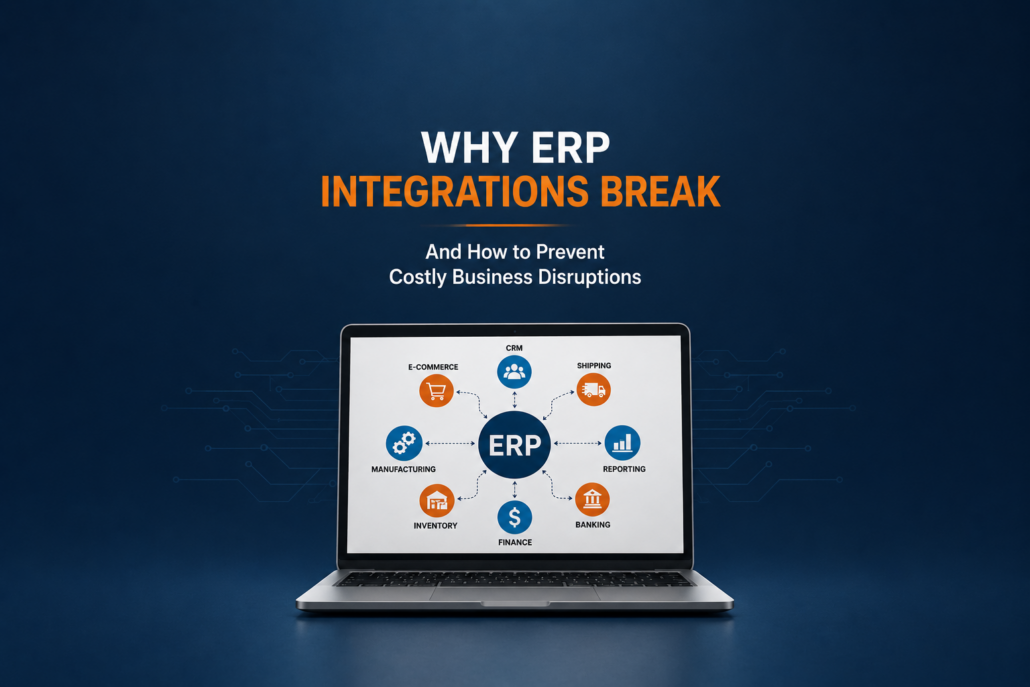
ERP integrations are supposed to make business operations easier. They eliminate duplicate data entry, connect critical systems, and help information flow across the organization.
Unfortunately, ERP integrations are also one of the most common sources of support requests.
Whether it’s an ecommerce platform failing to send orders, a CRM no longer updating customer records, or a shipping solution creating duplicate transactions, integration failures can quickly disrupt daily operations. For companies using SAP Business One and other ERP systems, understanding why ERP integrations break is the first step toward preventing costly downtime and business interruptions.
In this article, we’ll examine the most common causes of ERP integration failures and what businesses can do to avoid them.
Learn More: What Is ERP Integration? A Beginner’s Guide for Manufacturing and Distribution
ERP integrations are just one of the many challenges organizations face after implementing an ERP system. For a broader look at the most common ERP support issues businesses encounter, see our guide: The Most Common ERP Support Questions Businesses Ask.
Why ERP Integrations Matter
Modern ERP systems rarely operate in isolation.
Today’s businesses often connect their ERP system with:
- CRM platforms
- Ecommerce websites
- Shipping and logistics software
- Warehouse management systems
- Payroll applications
- Banking systems
- Business intelligence tools
- Accounts payable automation solutions
- Customer service platforms
These integrations create a connected business environment where information moves automatically between systems.
What are: The Most Common ERP Integrations for Manufacturing and Distribution Companies
When integrations work properly, employees save time and data remains consistent. When they fail, problems can spread quickly throughout the organization.
Successful integrations do more than connect systems. They can reduce manual work, improve accuracy, and create measurable business improvements.
Visit our Integrations page for more information on Support One Integration Services.
The Real Cost of ERP Integrations Failing
Many companies underestimate how much they depend on their integrations until one stops working.
Common consequences include:
- Missing customer orders
- Duplicate transactions
- Incorrect inventory levels
- Delayed shipments
- Inaccurate financial reporting
- Manual re-entry of data
- Lost productivity
- Customer service issues
A single failed integration can impact multiple departments simultaneously. Even when integrations don’t fail completely, they can still create significant performance issues. Poorly optimized integrations often increase database activity, slow transaction processing, and contribute to overall ERP system delays.
For example, if ecommerce orders stop syncing with your ERP system, inventory levels become inaccurate, customer deliveries are delayed, and financial reports may no longer reflect actual sales activity.
Inventory synchronization problems are among the most common consequences of failed ERP integrations. When inventory data becomes inaccurate, businesses can experience stockouts, overstock situations, and reporting discrepancies.
The 7 Most Common Reasons ERP Integrations Break
1. Software Updates Change the Rules
One of the most common causes of integration failures occurs after a software update.
Changes may occur in:
- ERP software
- Third-party applications
- APIs
- Security protocols
- Integration middleware
A minor update in one system can unexpectedly affect how information is exchanged.
This is particularly important for businesses running customized ERP environments or older integrations that haven’t been reviewed in several years. Custom integrations can provide significant business value, but they should be reviewed regularly to ensure they remain reliable, documented, and compatible with future ERP changes.
Read More: ERP Integration Challenges and How to Avoid Them
2. Poor Data Quality Creates Unexpected Errors
Many integration problems originate from data issues rather than technical failures.
Common examples include:
- Duplicate customer records
- Missing item numbers
- Invalid addresses
- Inconsistent naming conventions
- Incorrect tax codes
- Incomplete master data
When one system contains inaccurate information, integrations often struggle to process transactions correctly.
This problem becomes even more important as businesses begin exploring AI initiatives that rely on clean ERP data.
See Why: Clean ERP Data: The Foundation of AI and Automation
3. Authentication and Security Changes
Security is essential, but it can sometimes create integration challenges.
Common issues include:
- Expired passwords
- Changed credentials
- Security certificate expirations
- Modified user permissions
- Multi-factor authentication changes
An integration may function perfectly for months and then suddenly stop because a credential has expired or a security setting has changed.
These issues are often difficult to identify because users may not receive immediate notifications.
4. ERP Customizations Create Compatibility Problems
Customizations often solve important business challenges, but they can also complicate integrations.
Examples include:
- Custom fields
- User-defined tables
- Modified workflows
- Specialized reporting structures
- Third-party add-ons
When changes are made to the ERP environment without considering integration requirements, unexpected problems can occur.
Businesses should always evaluate how customizations may affect connected systems before making changes.
5. Data Mapping Errors
Every integration relies on mapping data between systems.
For example:
| System A | System B |
|---|---|
| Customer ID | Customer Number |
| Product Code | Item Number |
| Tax Category | Tax Group |
| Warehouse Code | Storage Location |
If these mappings become incorrect, data may:
- Fail to transfer
- Transfer to the wrong location
- Create duplicate records
- Generate reporting inaccuracies
Mapping issues are among the most common integration support requests we encounter. Integration problems often expose existing data quality issues. If customer, vendor, inventory, or financial data is inconsistent inside the ERP system, connected applications will often duplicate or spread those problems.
6. Network and Infrastructure Problems
Even well-designed integrations can fail when underlying infrastructure experiences problems.
Potential causes include:
- Internet outages
- VPN failures
- Firewall changes
- Cloud service interruptions
- Server downtime
As more businesses move toward cloud-based solutions, infrastructure dependencies become increasingly important.
Related Article: Cloud ERP +AI: The Real Shift Happening in Business Software
7. Nobody Is Monitoring the Integration
This may be the most preventable cause of integration failures.
Many organizations assume integrations are working simply because no one has reported a problem.
Unfortunately, integrations often fail silently.
Businesses sometimes discover:
- Orders have not synced for days
- Inventory updates stopped weeks ago
- Financial transactions are missing
- Customer records are incomplete
The longer an issue goes undetected, the more difficult it becomes to resolve.
Proactive monitoring can dramatically reduce the impact of integration failures. Integration failures can interrupt critical business processes even when the ERP system itself is available. Monitoring integrations and planning changes carefully can help reduce ERP downtime.
Integrations require ongoing monitoring and expertise. SAP Business One support services can help businesses maintain connected systems and resolve issues as requirements change.
Warning Signs Your ERP Integrations May Be Failing
Watch for these common indicators:
Inventory Discrepancies
Inventory levels differ between systems.
Duplicate Records
Customers, vendors, or items appear multiple times.
Missing Transactions
Orders, invoices, or payments fail to appear.
Unexpected Manual Work
Employees begin entering information manually.
Reporting Inconsistencies
Reports show conflicting results.
Customer Complaints
Customers report delayed shipments or inaccurate information.
These warning signs often indicate a deeper integration issue that requires investigation.
How to Prevent ERP Integrations From Failing
While no system is completely immune to problems, most integration failures can be prevented through proactive management.
Document Your Integrations
Maintain clear documentation of:
- Connected systems
- Data mappings
- Security requirements
- Support contacts
- Upgrade procedures
Documentation reduces risk and simplifies troubleshooting.
Monitor Integration Activity
Regular monitoring helps identify problems before they affect operations.
Organizations should review:
- Error logs
- Failed transactions
- Synchronization delays
- Performance metrics
Early detection often prevents larger business disruptions.
Test Before Every Upgrade
Before implementing updates:
- Test integrations in a non-production environment
- Validate data transfers
- Verify security settings
- Confirm compatibility
Testing significantly reduces upgrade-related surprises.
ERP upgrades can also affect connected systems. Before upgrading, businesses should review integrations to ensure data continues flowing correctly between applications.
Maintain Data Quality Standards
Consistent data management helps prevent integration errors.
Best practices include:
- Eliminating duplicate records
- Standardizing naming conventions
- Regular data audits
- User training
Clean data improves integration reliability. Successful integrations depend on accurate processes and informed users. Training helps employees understand how connected systems work together.
Schedule Regular Integration Reviews
Business processes evolve over time.
An integration that worked perfectly two years ago may no longer align with current requirements.
Periodic reviews help ensure integrations remain efficient and reliable.
Is Your ERP System Running Slow?
Integration problems are not always obvious. In some cases, poorly performing integrations create hidden bottlenecks that affect reporting, inventory transactions, and overall ERP responsiveness. If users are complaining about slow screens, delayed reports, or sluggish transaction processing, it may be worth investigating whether integrations are contributing to the issue.
Read next: Why Is My ERP System Running Slow? Common Causes and Fixes
SAP Business One ERP Integrations: Common Challenges
For SAP Business One customers, integrations frequently involve:
- CRM systems
- Ecommerce platforms
- Shipping providers
- Warehouse solutions
- AP automation software
- Reporting and analytics tools
Common support requests include:
- Service Layer connectivity issues
- DI API configuration problems
- Add-on compatibility concerns
- Upgrade-related integration failures
- Data synchronization challenges
As businesses grow, these integrations become increasingly important to daily operations.
The goal is not simply connecting systems but ensuring they remain reliable as technology evolves.
For more information on SAP Business One integration capabilities, see the official SAP resources:
When integrations fail, businesses often need more than a quick fix. A knowledgeable SAP Business One support team can help identify the root cause and improve long-term system reliability.
Successful integrations should not only connect systems; they should create measurable business improvements. Understanding the potential return on investment is an important part of choosing the right integration strategy.
Integration success often depends on having a partner who understands both SAP Business One and the surrounding business systems. Choosing the right support partner can help prevent recurring integration issues.
Why ERP Integrations Matter Even More in the Age of AI
Artificial Intelligence is rapidly becoming part of ERP environments.
However, AI systems depend on accurate and complete data.
If integrations are failing, AI tools may receive:
- Incomplete information
- Duplicate records
- Outdated inventory data
- Inaccurate financial information
In other words, poor integrations can limit the effectiveness of future AI initiatives.
This is one reason businesses should focus on ERP health before pursuing advanced AI projects.
You may also find these articles helpful:
- AI in ERP Systems: What It Actually Does Today
- The Future of AI in ERP: What Businesses Should Do Now
ERP integrations are only one piece of maintaining a healthy ERP environment. Learn about other common challenges involving performance, reporting, upgrades, security, and user adoption in our pillar article: The Most Common ERP Support Questions Businesses Ask.
Final Thoughts
ERP integrations are essential to modern business operations, but they are also one of the most common sources of ERP support challenges.
Most integration failures are not caused by a single catastrophic event. Instead, they result from small issues that accumulate over time—software updates, poor data quality, security changes, customization conflicts, and lack of monitoring.
The good news is that most of these problems are preventable. As businesses add more connected systems, they should regularly review integrations to ensure reliability, security, and compatibility.
By maintaining clean data, documenting integrations, monitoring performance, and testing changes before deployment, businesses can significantly reduce integration-related disruptions and improve the overall reliability of their ERP environment. See how to: Plan a Successful Integration Project.
Support One helps businesses design, troubleshoot, and optimize ERP integrations as part of our broader SAP Business One consulting and support services.
At Support One we help SAP Business One customers decide on which integrations will have the greatest immediate ROI and help make sure their system is ready to insure optimal benefits. Please see our Integration Page for more details.