
AI for SAP Business One: The Complete Practical Guide (2026)
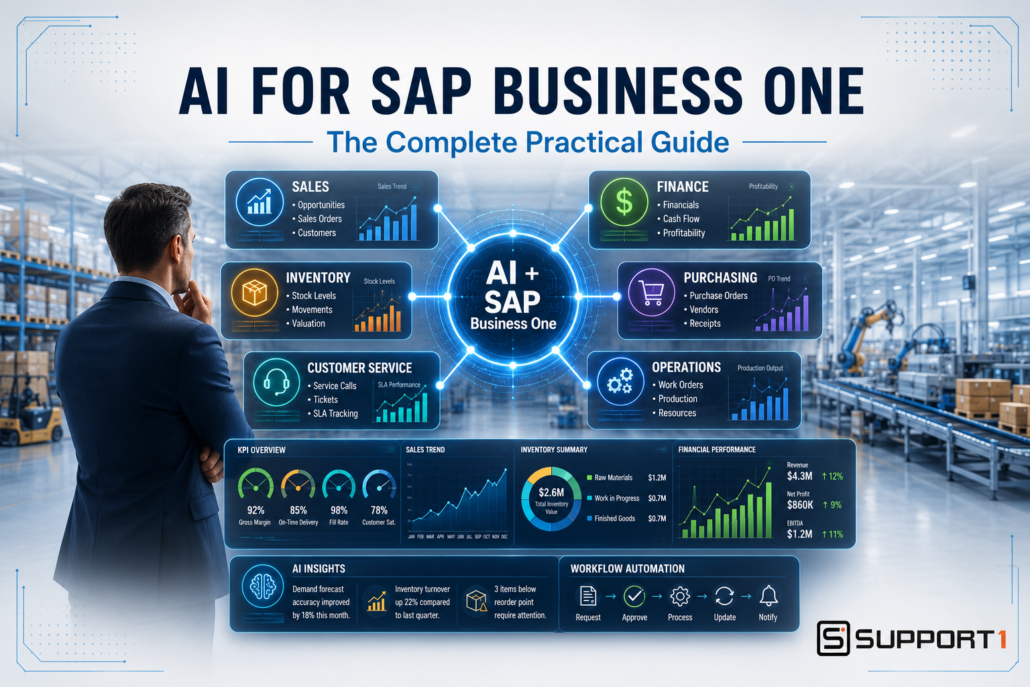
Practical AI for SAP Business One: The Complete Guide
Artificial intelligence is no longer a futuristic concept reserved for large enterprises. Practical AI for SAP Business One is helping small and midsize businesses improve productivity, make better decisions, and increase profitability using the data they already collect every day. Whether you’re a manufacturer, distributor, or service organization, AI can help your team work smarter—not harder. This practical guide explores SAP Business One AI use cases across sales, finance, inventory, purchasing, customer service, and management, with a focus on where AI can deliver real business value today.
The good news is that you don’t need to replace SAP Business One or make a massive technology investment to benefit from AI. In fact, the companies seeing the greatest success are those that use AI to complement their ERP system, automate repetitive tasks, analyze business data, and provide faster insights for better decision-making.
This guide brings together everything you need to know about using AI alongside SAP Business One. Whether you’re just beginning to explore artificial intelligence or looking for practical ways to expand your current capabilities, you’ll discover how AI can improve every area of your business while maximizing your ERP investment.
What Is Practical AI for SAP Business One?
One of the biggest misconceptions about artificial intelligence is that it will somehow replace your ERP system. That’s simply not the case. The most valuable SAP Business One AI use cases aren’t about replacing your ERP system—they’re about using the data already inside it more effectively.
SAP Business One remains the system that manages your core business operations, including:
- Financials
- Sales
- Purchasing
- Inventory
- Production
- Customer information
- Reporting
AI works alongside SAP Business One—not instead of it.
Think of SAP Business One as your company’s trusted source of business information. AI acts as an intelligent assistant that helps your employees understand that information faster, identify opportunities, and complete routine tasks more efficiently.
The following AI use cases for SAP Business One show how companies can apply AI across everyday business functions:
- Summarize financial reports in plain language
- Identify slow-moving inventory before it becomes a problem
- Draft customer emails
- Create training documentation
- Analyze purchasing trends
- Suggest sales opportunities
- Build standard operating procedures
- Explain complex reports to managers
Instead of replacing employees, AI helps employees spend less time gathering information and more time making informed business decisions.
As we explained in our article AI in ERP: What It Actually Does Today, artificial intelligence delivers the greatest value when it enhances the capabilities of your ERP system rather than attempting to replace it. That practical approach is exactly why AI adoption continues to grow among SAP Business One users.
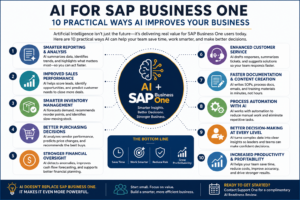
Discover 10 practical ways AI for SAP Business One helps manufacturers and distributors improve productivity, automate routine tasks, strengthen decision-making, and increase profitability.
Why AI for SAP Business One Matters to Every Business
Artificial intelligence isn’t becoming important because it’s the latest technology trend. It’s becoming important because business expectations have changed.
Customers expect faster service.
Managers expect real-time information.
Executives want quicker answers.
Employees want tools that eliminate repetitive work.
Companies that can respond more quickly and make better decisions gain a competitive advantage.
Fortunately, SAP Business One already contains much of the information AI needs to help businesses achieve those goals.
Imagine asking questions like:
- Which customers generated the highest profit last quarter?
- Which inventory items should we reduce?
- Which products have declining margins?
- Which vendors consistently deliver late?
- What trends should management pay attention to this month?
Traditionally, answering those questions might require multiple reports, spreadsheets, and hours of analysis.
With AI, many of those answers can be summarized in seconds, allowing managers to focus on making decisions instead of gathering information.
Just as importantly, AI isn’t limited to executives. Employees throughout the organization can benefit from practical AI tools.
Sales teams can identify new opportunities.
Customer service representatives can respond more quickly.
Purchasing managers can improve buying decisions.
Finance departments can analyze trends faster.
Warehouse managers can better predict inventory needs.
The result isn’t simply increased efficiency—it often leads to improved customer satisfaction, lower operating costs, and greater profitability.
These SAP Business One AI use cases become particularly valuable when AI is applied to specific operational challenges.
If your goal is to increase business performance, you’ll also want to read our guide on How AI Helps SAP Business One Users Increase Revenue and Profit, which explores many of these business benefits in greater detail.
Practical AI for SAP Business One: Where to Start
One of the biggest mistakes companies make is assuming that AI can solve existing business problems without first addressing the quality of their ERP data.
Artificial intelligence is only as reliable as the information it receives.
If your ERP system contains inconsistent inventory records, duplicate customer information, inaccurate pricing, or outdated vendor data, AI will simply analyze flawed information more quickly.
That’s why preparing your ERP system is one of the most important steps in any AI initiative.
Businesses that achieve the greatest success with AI typically have several things in common.
Clean and Accurate Data
AI depends on reliable information.
Your organization should regularly review:
- Customer records
- Vendor information
- Inventory data
- Bills of materials
- Product descriptions
- Financial records
Even small improvements in data quality can significantly improve the accuracy of AI-generated insights.
If improving data quality is one of your priorities, our article Clean Data for AI in ERP Systems explains why clean ERP data is the foundation of every successful AI project.
Standardized Business Processes
Artificial intelligence works best when your business follows consistent procedures.
Examples include:
- Sales order processing
- Purchasing approvals
- Inventory transactions
- Production reporting
- Customer service workflows
Well-defined processes allow AI to recognize patterns and recommend improvements more effectively.
Connected Business Systems
Many organizations use additional software alongside SAP Business One, including:
- CRM systems
- Shipping software
- Warehouse management systems
- Document management solutions
- eCommerce platforms
- Business intelligence tools
The more effectively these systems share information, the more value AI can provide across your organization.
Support One has helped many businesses improve efficiency through ERP integrations that eliminate duplicate data entry and improve information flow between systems.
Meaningful Reporting
One of AI’s greatest strengths is interpreting business information.
But first, that information needs to be available.
Companies should ensure they have reliable reporting for:
- Sales performance
- Inventory management
- Purchasing
- Production
- Financial results
- Customer activity
Strong reporting gives AI the information it needs to identify trends, summarize performance, and help management make faster, more informed decisions.
AI in SAP Business One Employee Adoption
Technology alone doesn’t create business value.
People do.
The organizations seeing the greatest return from AI are those that encourage employees to experiment with practical use cases while providing training and clear expectations.
AI should become another business tool—not something employees fear or avoid.
Encouraging responsible AI usage while maintaining appropriate human oversight creates the strongest long-term results.
As AI adoption grows, organizations should also establish clear policies regarding data privacy, security, and employee responsibilities. Our article AI Governance: The Missing Piece explains why governance is becoming an essential part of every successful AI strategy.
Building the Right Foundation
Preparing SAP Business One for AI isn’t about purchasing new software—it’s about strengthening the systems and processes you already have in place.
Companies with clean data, consistent workflows, meaningful reporting, and well-maintained ERP systems are positioned to adopt AI much more quickly and achieve better results.
If you’re unsure whether your organization is ready, our article Why Most ERP Systems Aren’t AI-Ready outlines the most common obstacles businesses face and practical steps to overcome them before implementing AI.
What SAP Business One AI Can Do Today
SAP Business One AI Is Becoming a Reality
When we originally created this guide, many SAP Business One AI use cases involved using ERP data with external artificial intelligence tools, integrations, business intelligence platforms, and emerging AI technologies.
That landscape is beginning to change.
SAP is introducing AI capabilities that bring artificial intelligence closer to the SAP Business One user experience. One of the most interesting developments is Ask AI, which demonstrates how users can ask business questions in natural language and receive insights based on SAP Business One information.
Instead of requiring users to know exactly which report to run or where specific information is located, the direction is toward a much more conversational experience.
A user could increasingly think in terms of a business question:
What is happening in my business?
rather than:
Which report do I need to run?
That may sound like a small difference, but it represents a major change in how people could interact with ERP information.
Ask Business Questions in Natural Language
Traditional ERP systems require users to understand the structure of the software.
They need to know:
- Which module contains the information
- Which report to run
- Which fields to select
- Which filters to apply
- How to interpret the results
AI creates another approach.
Instead of navigating through several screens, users can potentially express what they want to know in ordinary business language.
For example, a business owner might want to understand:
Which customers have reduced their purchases recently?
A sales manager might want to investigate:
Which products are selling better this quarter than last quarter?
An inventory manager might ask:
Which items deserve my attention because inventory levels and demand are changing?
A finance manager might want to know:
What changed in our financial performance this month?
The important development isn’t simply that AI can answer questions.
It’s that SAP Business One data can become easier for ordinary business users to explore and understand.
This is one of the most practical SAP Business One AI use cases because it reduces the distance between a business question and the information needed to answer it.
Ask AI Does Not Replace Everything We’ve Discussed in This Guide
This distinction is important.
Ask AI does not suddenly mean that every AI application described in this guide is now built directly into SAP Business One.
More advanced SAP Business One AI use cases may still require additional tools, integrations, specialized applications, or external information.
Examples could include:
- Advanced demand forecasting
- Predictive maintenance using machine or sensor data
- Sophisticated production optimization
- Customer sentiment analysis
- External market analysis
- Complex supply-chain predictions
- Automated AI agents
That’s why we should think about SAP Business One AI in layers.
Native SAP Business One AI capabilities can make ERP information easier to access and understand.
Connected AI applications can combine SAP Business One information with other systems and specialized tools.
Advanced AI applications can analyze larger datasets, external information, equipment data, documents, communications, and other sources.
The important point is that these aren’t competing approaches.
They’re part of the same evolution.
SAP Business One FP 2608 Is an Important Step
SAP Business One 10.0 FP 2608 also includes AI-related capabilities for Web Client development. SAP provides an example of using Copilot with its Web Client UI API documentation to help developers build UI controls and dialogs from natural-language prompts.
That capability is different from Ask AI for business users, but together they illustrate something important:
AI is moving from something SAP Business One customers simply discuss to something increasingly connected with the SAP Business One ecosystem itself.
For businesses considering AI, that makes preparation more important—not less.
See the power of Ask AI in action – View these two new videos from SAP on our Resources Page
Coming Up Next
In the next section of this guide, we’ll explore the practical ways businesses are already using AI alongside SAP Business One—from sales and customer service to finance, inventory, purchasing, and executive decision-making. You’ll see real-world examples of how AI is helping companies work smarter, improve productivity, and uncover new opportunities for growth.
Part 2 – Practical Ways Businesses Are Using AI Today
One of the biggest reasons AI has gained so much attention is that it is no longer limited to research labs or Fortune 500 companies. Businesses of every size are finding practical ways to use AI to improve productivity, make better decisions, and provide better customer service.
For SAP Business One users, the greatest opportunity isn’t replacing existing business processes—it’s making them smarter.
Instead of spending hours gathering information from reports and spreadsheets, AI can help employees find answers faster, identify trends, and focus on higher-value work.
Let’s look at how businesses are using AI across different departments today.
AI isn’t limited to one department. When combined with SAP Business One, it can improve productivity and decision-making across nearly every area of your business. The infographic below highlights some of the most common ways organizations are putting AI to work today.
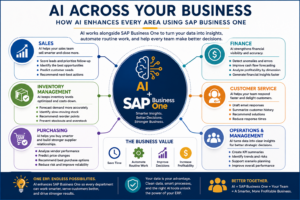
See how AI helps every department work smarter by improving sales, finance, inventory management, purchasing, customer service, and executive decision-making.
AI for Sales: Turning Data into Revenue
Sales teams have always depended on good information. The challenge isn’t collecting customer data—it’s knowing what to do with it.
By combining AI with the customer and sales information already stored in SAP Business One, sales teams can quickly uncover opportunities that might otherwise go unnoticed.
AI can help identify:
- Customers who haven’t ordered recently
- Products frequently purchased together
- Upsell opportunities
- Customers approaching reorder dates
- Sales trends by industry or region
- Accounts with declining sales activity
Instead of reviewing dozens of reports each week, sales managers can ask AI questions such as:
“Which customers haven’t placed an order in the past 90 days?”
or
“Which customers purchased Product A but never purchased Product B?”
These insights allow sales teams to spend more time selling and less time searching for information.
Key Takeaway
AI doesn’t replace your sales team—it helps them prioritize the right opportunities. By identifying trends and customer buying patterns, AI enables sales representatives to have more meaningful conversations that can increase revenue without increasing headcount.
One of the most practical SAP Business One AI use cases is helping sales teams analyze customer behavior, identify opportunities, recognize declining accounts, improve forecasts, and focus their attention where it can have the greatest impact.
Sales ERP data can become much more valuable with artificial intelligence. Using AI for sales can help SAP Business One users identify opportunities, uncover cross-sell potential, improve forecasting, protect margins, and give salespeople better customer information.
For a deeper look at these opportunities, see our guide to AI for Sales, including practical examples and prompts SAP Business One users can explore.
If you’d like to see the future of AI in ERP and what you can do now to prepare your business, read our article The Future of AI in ERP: And What Businesses Should Do Now
AI for Customer Service: Faster Answers, Better Experiences
Customer expectations continue to rise.
People want accurate answers—and they want them quickly.
AI can help customer service teams by gathering information from multiple sources and presenting it in a way that’s easy to understand.
Examples include:
- Summarizing customer account history
- Drafting email responses
- Finding warranty information
- Searching knowledge bases
- Recommending troubleshooting steps
- Creating customer follow-up summaries
Imagine a customer calling with a problem.
Instead of opening multiple windows to review invoices, shipments, previous service calls, and email history, AI can summarize that information in seconds.
The representative spends less time searching and more time solving the customer’s problem.
For businesses with limited support staff, this can significantly improve both customer satisfaction and employee productivity.
Customer service provides another valuable SAP Business One AI use case because AI can help employees understand customer history, orders, products, service issues, and other information before responding.
Our AI Customer Service guide explores how businesses can use AI to respond faster, prepare employees for customer conversations, identify recurring issues, and improve the overall customer experience.
Another practical application is AI for Field Service Management, which can help service organizations improve technician scheduling, job preparation, parts planning, first-time fix rates, and customer communication.
AI for Finance: Better Insights, Not Just Better Reports
Finance departments already produce an incredible amount of information.
Income statements.
Balance sheets.
Cash flow reports.
Budgets.
Variance reports.
The challenge is understanding what those reports are telling you.
AI excels at finding patterns.
Instead of simply displaying financial information, AI can help explain it.
For example:
- Why did gross margin decline?
- Which product lines are becoming less profitable?
- What expenses changed significantly this month?
- Which customers consistently pay late?
- What trends should management monitor?
AI doesn’t replace financial expertise.
It helps finance professionals identify the areas that deserve attention first.
That allows controllers and CFOs to spend more time making strategic recommendations rather than manually analyzing spreadsheets.
Financial analysis is one of the strongest SAP Business One AI use cases because ERP data can potentially help AI identify unusual changes, investigate costs, compare performance, explain variances, and uncover trends that deserve management attention.
Finance is one of the departments seeing the fastest return from artificial intelligence. In our guide learn how AI Financial Management helps improve cash flow, accelerate reporting, strengthen forecasting, and support better executive decision-making.
AI for Inventory Management: Smarter Planning, Better Cash Flow
Inventory is one of the largest investments many manufacturers and distributors make.
Too much inventory ties up cash.
Too little inventory creates stock shortages and unhappy customers.
AI helps organizations strike a better balance.
Using historical sales, seasonal trends, purchasing patterns, and inventory movement, AI can identify:
- Slow-moving inventory
- Excess inventory
- Products likely to stock out
- Seasonal demand
- Purchasing recommendations
- Inventory trends by warehouse
Warehouse managers no longer need to rely solely on intuition.
Instead, AI provides recommendations based on actual business data.
This allows businesses to reduce carrying costs while maintaining excellent customer service.
Pro Tip
Start with one inventory challenge instead of trying to optimize your entire warehouse at once. Many companies see immediate value by asking AI to identify slow-moving inventory or products at risk of stocking out. Small, focused projects often deliver quick wins and build confidence for larger AI initiatives.
Inventory management is another practical SAP Business One AI use case, particularly when businesses want to identify changing demand, potential shortages, excess inventory, slow-moving items, and other conditions that affect cash flow and customer service.
In our guide learn how AI Inventory Management helps manufacturers and distributors reduce stockouts, improve forecasting, lower inventory costs, and make smarter purchasing decisions.
Another practical application is AI for Demand Forecasting, which can help SAP Business One users identify changing demand patterns and improve inventory, purchasing, and production planning.
If inventory optimization is one of your priorities, you’ll also find valuable information in our guide to Top 10 AI in ERP Systems Use Cases That Deliver Real ROI.
AI for Purchasing: Making Better Buying Decisions
Purchasing professionals manage hundreds or even thousands of buying decisions each year.
AI can simplify many of those decisions by analyzing:
- Vendor performance
- Historical pricing
- Purchase frequency
- Delivery times
- Contract compliance
- Material usage
Rather than manually comparing reports, purchasing managers can ask AI questions like:
Which suppliers consistently deliver late?
or
Which vendors have increased prices the most over the past year?
AI can also help identify opportunities to consolidate purchases, reduce costs, or negotiate better terms with suppliers.
Combined with the purchasing information already stored in SAP Business One, AI becomes another valuable decision-support tool.
Purchasing offers several valuable SAP Business One AI use cases, from identifying upcoming material requirements and supplier trends to analyzing lead times, purchasing history, pricing changes, and potential supply risks.
Purchasing is one of the fastest areas to benefit from artificial intelligence. Learn how AI Purchasing helps manufacturers reduce costs, strengthen supplier relationships, and make smarter procurement decisions using SAP Business One.
For a broader look at how AI can connect demand, inventory, purchasing, production, warehouse activity, and fulfillment, see our guide to AI for Supply Chain Management.
AI for Warehouse Management: Faster, More Accurate Operations
Warehouses generate enormous amounts of operational data involving receipts, inventory locations, replenishment, picking, packing, and shipping. That makes warehouse management another promising area for practical AI.
One of the emerging SAP Business One AI use cases is using connected warehouse and ERP information to help identify picking problems, replenishment requirements, workload priorities, shipping issues, and opportunities to improve warehouse efficiency.
Our AI Warehouse Management guide explores 10 practical ways AI can help warehouse teams work faster, reduce errors, and make better operational decisions.
AI for Manufacturing: Smarter Production Decisions
Manufacturers have an additional layer of complexity because sales demand, inventory, purchasing, production, warehouse activity, quality, and financial performance are closely connected.
Manufacturing therefore represents one of the most valuable SAP Business One AI use cases for companies that want to improve production planning, identify material shortages, uncover bottlenecks, reduce scrap, understand production costs, and make better use of production data.
Our new AI for Manufacturing guide explores 10 practical applications, along with example prompts and recommendations for getting started.
AI for Executive Decision-Making
Executives rarely struggle with a lack of data.
They struggle with having too much of it.
Every week, management teams receive dozens of reports.
The challenge is identifying which information actually matters.
AI can summarize business performance into concise, actionable insights.
Examples include:
- Weekly executive summaries
- KPI analysis
- Sales trends
- Profitability by customer
- Inventory health
- Cash flow highlights
- Production performance
Instead of reading dozens of reports, executives can begin each week with an AI-generated summary highlighting the most significant changes.
This doesn’t replace detailed reporting.
It helps management determine where to focus their attention.
Executive decision-making may become one of the most important SAP Business One AI use cases as natural-language tools make it easier for managers to ask questions about sales, inventory, purchasing, operations, and financial performance without starting with a specific report.
The emerging Ask AI experience discussed earlier in this guide demonstrates why conversational access to SAP Business One information could be especially valuable to owners and executives who want answers without navigating through multiple reports.
AI for Documentation and Employee Training
One of the least discussed—but most valuable—uses of AI is documentation.
Every organization depends on written procedures.
Unfortunately, documenting business processes often falls to the bottom of the priority list.
AI can dramatically reduce the time required to create:
- Standard operating procedures
- Employee training guides
- Department manuals
- Process documentation
- Job aids
- Meeting summaries
For example, an experienced purchasing manager can explain a process to AI, which then drafts a professional procedure document for review and refinement.
The result is faster documentation, more consistent training, and less dependence on tribal knowledge.
As experienced employees retire or move into new roles, documented processes become increasingly valuable.
Documentation and training are also useful SAP Business One AI use cases, particularly when AI helps employees locate procedures, summarize approved information, explain processes, or find answers within company knowledge resources.
Not every SAP Business One AI use case should be implemented at once. Start with the opportunities that solve a measurable business problem and rely on data you can trust.
How AI for SAP Business One Helps People—Not Replaces Them
One concern many business leaders have is whether AI will replace employees.
In reality, the most successful organizations are using AI to eliminate repetitive work—not people.
Think about the tasks employees perform every day:
- Searching for information
- Writing routine emails
- Summarizing meetings
- Creating reports
- Documenting procedures
- Comparing spreadsheets
These activities are important, but they don’t necessarily create value for customers.
AI helps reduce the time spent on repetitive administrative work so employees can focus on higher-value activities such as:
- Solving customer problems
- Building relationships
- Improving business processes
- Identifying new opportunities
- Making strategic decisions
That’s where the greatest return on investment comes from.
As these SAP B1 AI use cases demonstrate, the biggest gains often come from improving existing processes rather than trying to automate everything.
Companies beginning their AI journey can also benefit from a simple step-by-step approach to identifying opportunities, preparing data, and choosing practical AI projects.
Looking Ahead
As you’ve seen, practical AI can improve nearly every department within a business—from sales and customer service to finance, purchasing, inventory management, and executive decision-making.
But AI isn’t the only technology helping organizations become more efficient.
In the next section, we’ll explore the difference between AI and automation, examine the AI tools that work well alongside SAP Business One, and share practical prompts your team can begin using immediately to improve productivity.
Part 3 – AI, Automation, Tools, and Practical Prompts
Understanding what AI can do is important. Knowing how to apply it is where the real value begins.
Many businesses are already using automation inside SAP Business One to reduce repetitive work. AI adds another layer by helping employees interpret information, create content, identify patterns, and make better decisions.
These SAP Business One AI use cases become much more practical when businesses understand which problems require AI, which require automation, and which may benefit from both.
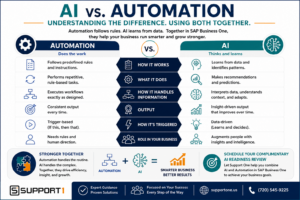
Learn the difference between AI and automation in SAP Business One. See how automation handles repetitive tasks while AI provides insights, recommendations, and smarter decision-making—and why using both together delivers the greatest business value.
AI for SAP Business One vs. Automation: What’s the Difference?
AI and automation are often discussed as though they are the same thing. They are related, but they serve different purposes.
Automation follows predefined rules.
AI interprets information and generates recommendations or responses.
For example, automation can:
- Send an invoice after an order is completed
- Route a purchase request for approval
- Update inventory after a shipment
- Create a recurring financial report
- Notify a manager when stock falls below a set level
AI can:
- Explain why inventory levels changed
- Summarize the most important information in a report
- Suggest which customers need follow-up
- Draft an email based on account history
- Identify unusual patterns that may require attention
Automation is especially useful when a task follows the same steps every time. AI becomes valuable when the task requires interpretation, language, comparison, or judgment.
How AI and Automation Work Together
Consider a company that wants to improve its collections process.
Automation might generate a list of overdue invoices every morning.
AI could then:
- Group customers by payment risk
- Summarize each customer’s payment history
- Draft personalized follow-up emails
- Recommend which accounts need immediate attention
A credit manager still reviews the information and decides what action to take, but much of the preparation is completed automatically.
Another example is inventory management.
Automation can notify a purchasing manager when inventory reaches a reorder point. AI can add context by reviewing sales velocity, seasonal demand, supplier lead times, and current purchase orders before suggesting how much to order.
Key Takeaway
Automation performs a defined task. AI helps people understand information and decide what to do next. When used together, they can create faster, smarter, and more consistent business processes.
For a deeper explanation, read our guide to AI vs. Automation: Stop Confusing the Two. You may also find useful examples in our article on SAP Business One Automation: Save Time, Reduce Costs, and Improve Efficiency.
AI Tools for SAP Business One Users
Most businesses do not need to begin with an expensive, highly customized AI project.
Many practical use cases can start with widely available AI tools used alongside reports, spreadsheets, exported data, procedures, and other information from SAP Business One.
It is important to understand that these tools do not automatically have access to your SAP Business One system. Unless a secure integration has been configured, employees typically provide the information they want the AI tool to analyze.
That may include:
- Exported reports
- Spreadsheet data
- Redacted customer information
- Process documentation
- Product descriptions
- Meeting notes
- Policies and procedures
Several general-purpose AI platforms can support this type of work.
ChatGPT
ChatGPT can help employees analyze information, write and revise content, summarize documents, generate ideas, and explain complex topics in plain language.
Possible business uses include:
- Summarizing sales or inventory reports
- Drafting customer communications
- Creating procedures
- Developing training materials
- Comparing performance between periods
- Preparing meeting agendas
- Turning rough notes into professional documents
Microsoft Copilot
Microsoft Copilot can be especially useful for businesses that already rely heavily on Microsoft 365.
Depending on the version and configuration, it may help employees work with applications such as:
- Excel
- Word
- Outlook
- Teams
- PowerPoint
A finance manager might use it to summarize spreadsheet trends. A salesperson might use it to draft a follow-up email. A manager might use it to turn meeting notes into an action list.
Claude
Claude is commonly used for reviewing, summarizing, and organizing longer documents.
It can be useful for tasks such as:
- Comparing policies
- Reviewing process documentation
- Summarizing lengthy reports
- Drafting detailed procedures
- Organizing complex information into clear sections
Perplexity
Perplexity is designed primarily as an AI-assisted research tool.
It can help users:
- Research industries
- Review market developments
- compare business concepts
- Locate supporting sources
- Explore unfamiliar topics
It is generally more useful for external research than for analyzing confidential ERP information.
Specialized and Embedded AI Tools
Businesses may also use AI capabilities built into other software, including:
- CRM platforms
- Business intelligence tools
- Customer service applications
- AP automation systems
- Document management solutions
- Forecasting applications
Over time, more AI functionality will become embedded directly into the applications employees already use.
The right starting point depends on the business problem you are trying to solve—not on which AI platform receives the most attention.
Choosing the Right AI Tool for SAP Business One
There is no single AI tool that is ideal for every task.
A better approach is to begin with the outcome you want.
For example:
| Business Need | Possible AI Use |
|---|---|
| Understand a financial report | Ask AI to summarize key changes and variances |
| Improve customer communication | Draft or revise emails |
| Create employee training | Turn notes into procedures and checklists |
| Analyze inventory | Review exported data for slow-moving or excess stock |
| Prepare for a management meeting | Summarize KPIs and create discussion questions |
| Research an industry issue | Use an AI research tool with cited sources |
Before choosing a platform, consider:
- What information will employees provide?
- Does the information contain confidential data?
- Who will review the output?
- How will accuracy be verified?
- Does the tool meet your company’s security requirements?
- Can the result be measured?
AI should be selected based on the use case, security requirements, and expected business value.
Pro Tip
Do not begin by purchasing several AI tools at once. Choose one business problem, test one tool, document the results, and decide whether the process should be expanded.
Different SAP Business One AI use cases may require different tools depending on the data involved, the business problem, security requirements, and the desired outcome.
Protecting SAP Business One Data When Using AI
Convenience should never override data security.
Employees should not enter sensitive ERP information into a public AI tool unless the organization has reviewed and approved that use.
Sensitive information may include:
- Customer names and contact details
- Pricing agreements
- Employee information
- Banking details
- Credit card information
- Vendor contracts
- Proprietary product information
- Financial records
- Passwords or login credentials
Before allowing employees to use AI with business data, companies should establish clear rules.
These rules should explain:
- Which AI tools are approved
- What information may be uploaded
- What information is prohibited
- When data must be anonymized
- Who is responsible for reviewing outputs
- How AI-generated work should be documented
In many cases, employees can remove identifying details before submitting information.
Instead of using an actual customer name, for example, the data could refer to “Customer A.” Specific account numbers, addresses, and confidential pricing can also be removed when they are not necessary for the analysis.
Responsible AI use requires both appropriate technology and clear governance. Our article AI Without Governance is a Business Risk Multiplier explains why AI Governance is becoming one of the most important topics in business today. AI is moving fast—faster than most organizations are prepared for—and the gap between adoption and governance is where real business risk is emerging.
How to Write Better AI Prompts
The quality of an AI response depends heavily on the quality of the instructions it receives.
The following prompts demonstrate how SAP Business One AI use cases can begin with simple business questions rather than complicated technology projects.
A vague request usually produces a vague answer.
For example:
Analyze this report.
That prompt does not explain what kind of analysis is needed, who will use it, or what the final response should include.
A stronger prompt might be:
Review this monthly sales report. Identify the five largest changes compared with the previous month, explain possible causes, and create a short summary for our management meeting. Present the results in a table followed by three recommended questions for the sales team.
The second prompt provides:
- Context
- A specific task
- A desired format
- An intended audience
- A clear outcome
A Simple Prompt Framework
Employees can improve their prompts by including five elements:
1. Role
Tell the AI what perspective to use.
Act as an inventory analyst.
2. Context
Explain the business situation.
We are a wholesale distributor using SAP Business One.
3. Task
State exactly what you want completed.
Review the attached inventory report and identify slow-moving items.
4. Format
Describe how the answer should be presented.
Create a table with item number, quantity on hand, last sale date, and recommended action.
5. Boundaries
Explain any limits or requirements.
Do not make assumptions when data is missing. List any additional information needed.
Using this structure produces more consistent and useful results.
Practical AI Prompts for SAP Business One
The following examples can be adapted to many common business situations.
Employees should always remove confidential information and follow company security policies before providing data to an AI tool.
Sales Analysis Prompt
Act as a sales analyst for a manufacturing and distribution company. Review the sales report I provide and identify the largest increases and decreases by customer, product, and salesperson. Highlight unusual changes, possible follow-up opportunities, and any questions management should investigate. Present the results in a concise table followed by an executive summary.
Customer Follow-Up Prompt
Draft a professional follow-up email to a customer who has not ordered in six months. Thank them for their past business, ask whether their needs have changed, and invite them to discuss upcoming requirements. Keep the tone helpful and relationship-focused rather than overly promotional.
Inventory Analysis Prompt
Act as an inventory manager. Review the exported inventory data and identify items that may be overstocked, slow-moving, or at risk of stocking out. Explain the reason for each recommendation. Do not make a recommendation when the available data is insufficient.
Purchasing Prompt
Review this vendor purchasing history. Compare prices, order frequency, lead times, and late deliveries. Identify vendors that may require attention and suggest questions the purchasing manager should ask before the next supplier review.
Financial Variance Prompt
Act as a financial analyst. Compare this month’s income statement with the previous month and the same month last year. Identify significant variances, explain possible business causes, and create a list of questions for the controller. Do not present assumptions as facts.
Accounts Receivable Prompt
Review this anonymized accounts receivable aging report. Group balances by risk level, identify the accounts that require immediate attention, and recommend a follow-up order. Create a short management summary without making legal or credit decisions.
Standard Operating Procedure Prompt
Create a standard operating procedure from the notes below. Include the purpose, responsibilities, required information, step-by-step instructions, common mistakes, and a final review checklist. Write it for a new employee with limited SAP Business One experience.
Employee Training Prompt
Turn this process description into a 30-minute employee training outline. Include learning objectives, key concepts, a step-by-step demonstration, practice questions, and a short knowledge check.
Management Summary Prompt
Review the attached KPI report and create a one-page executive summary. Highlight the most important positive and negative changes, identify areas requiring management attention, and suggest five questions for the leadership meeting.
Customer Service Prompt
Use the information below to draft a clear and empathetic response to a customer reporting a delayed order. Acknowledge the issue, explain the current status without assigning blame, and provide the next action and expected follow-up time.
Always Review AI-Generated Work
AI can produce useful results quickly, but it can also make mistakes.
It may:
- Misinterpret data
- Overlook important context
- Present assumptions as facts
- Use outdated information
- Produce inaccurate calculations
- Recommend an action that does not fit your policies
Every meaningful AI output should be reviewed by someone who understands the business process.
Finance professionals should review financial analysis.
Purchasing managers should verify supplier recommendations.
Sales leaders should confirm customer insights.
Human review is not a temporary requirement that disappears as AI improves. It is an essential control that protects the business and improves decision quality.
AI should support judgment—not replace accountability.
Start With a Repeatable Use Case
Experimenting with AI is useful, but long-term value comes from turning successful experiments into repeatable processes.
Suppose a sales manager uses AI to summarize a weekly sales report.
Once the process proves helpful, the company can document:
- Which report to export
- Which fields to include
- What information must be removed
- Which prompt to use
- Who reviews the summary
- Where the final report is stored
- How results are measured
This turns an occasional AI experiment into a controlled business process.
The same approach can be applied to:
- Monthly financial summaries
- Inventory reviews
- Vendor scorecards
- Customer follow-up
- Meeting preparation
- Employee training
- Process documentation
Start small, document what works, and expand only after the business value is clear.
AI in SAP Business One – Coming Up Next
AI tools can help employees analyze information, improve communication, and work more efficiently. However, successful adoption requires more than access to technology.
One recent example is SAP Business One FP 2608, which introduces Ask AI and AI-assisted query creation within the Web Client.
In the next part of this guide, we will examine the most common AI mistakes businesses make, the best practices that lead to stronger results, and the questions SAP Business One users frequently ask about artificial intelligence.
Part 4 – Best Practices, Common Mistakes, Frequently Asked Questions, and Getting Started
Artificial intelligence offers tremendous opportunities for manufacturers, distributors, and other businesses using SAP Business One. However, successful AI adoption isn’t determined by the software you purchase—it’s determined by how thoughtfully you implement it.
The organizations achieving the greatest return on investment are taking a practical, disciplined approach. They start with a clear business objective, involve the right people, establish governance, and build on early successes.
Let’s look at some of the most common pitfalls to avoid and the best practices that lead to long-term success.
Common AI for SAP Business One Mistakes to Avoid
Many companies are eager to begin using AI, but enthusiasm alone doesn’t guarantee success. Understanding the most common mistakes can help your organization avoid unnecessary frustration and achieve better results more quickly.
Trying to Solve Everything at Once
One of the biggest mistakes organizations make is attempting to implement AI across every department simultaneously.
AI works best when businesses begin with a single, well-defined problem.
For example:
- Automating management summaries
- Identifying slow-moving inventory
- Improving customer email responses
- Creating employee documentation
Early successes build confidence and help employees become comfortable with AI before expanding into larger initiatives.
Ignoring Data Quality
Artificial intelligence depends on reliable business information.
If customer records are inconsistent, inventory quantities are inaccurate, or financial data is incomplete, AI will produce unreliable recommendations.
Before expanding AI initiatives, organizations should regularly review:
- Customer master data
- Vendor information
- Item master records
- Bills of material
- Pricing
- Financial information
Clean data remains one of the most valuable investments a company can make.
Believing AI Is Always Correct
AI generates predictions and recommendations—not absolute truth.
It may:
- Misinterpret incomplete information
- Miss recent business changes
- Draw incorrect conclusions
- Present assumptions with confidence
Business professionals must continue reviewing important decisions before acting.
Human judgment remains essential.
Overlooking Security
Employees should understand exactly what business information may—and may not—be entered into AI tools.
Organizations should establish policies covering:
- Approved AI platforms
- Confidential information
- Customer privacy
- Financial information
- Intellectual property
- Data retention
- User responsibilities
Strong governance protects both the organization and its customers.
Failing to Train Employees
Providing employees with AI access is not the same as providing AI training.
Employees should understand:
- How AI works
- How to write effective prompts
- How to verify results
- When AI should not be used
- Company policies regarding data security
Well-trained employees produce significantly better AI results than employees who simply experiment on their own.
Key Takeaway
AI success is less about technology and more about people, processes, and trusted data. Businesses that build a strong foundation before expanding AI initiatives consistently achieve better long-term results.
Best Practices for AI for SAP Business One
After working with hundreds of ERP customers over the years, we’ve learned that successful technology initiatives usually share several common characteristics.
The best SAP Business One AI use cases start with a clearly defined business problem, reliable data, and a measurable result.
Start with One Business Problem
Choose a project that:
- Is repetitive
- Consumes employee time
- Has measurable results
- Doesn’t involve unnecessary risk
Examples include:
- Weekly executive summaries
- Customer follow-up emails
- Inventory analysis
- Process documentation
Small projects often deliver surprisingly large returns.
Focus on Business Value
Avoid implementing AI simply because it’s available.
Instead, ask questions such as:
- Will this save employees time?
- Will this improve customer service?
- Will this reduce errors?
- Will this increase revenue?
- Will this lower operating costs?
Technology should always support business objectives.
Develop Standard Prompts
When employees discover prompts that consistently produce useful results, save them.
Create an internal prompt library for common activities such as:
- Financial analysis
- Inventory reviews
- Purchasing summaries
- Customer communications
- Meeting preparation
- Standard operating procedures
This creates consistency while reducing the learning curve for new employees.
Measure Results
Like any business initiative, AI projects should be measured.
Possible metrics include:
- Time saved
- Reduction in manual work
- Faster report preparation
- Improved customer response time
- Lower operating costs
- Increased sales opportunities
- Employee satisfaction
Tracking results helps justify future AI investments.
Review and Improve
AI implementation should be viewed as an ongoing improvement process.
As employees gain experience, prompts improve.
Business processes improve.
Documentation improves.
New opportunities emerge.
Organizations that continuously refine their AI usage typically realize increasing benefits over time.
Pro Tip
Treat AI like a new employee. It needs clear instructions, regular feedback, and ongoing supervision. The better you train it through well-designed prompts and documented processes, the more valuable it becomes.
AI for SAP Business One FAQs
What is Practical AI for SAP Business One?
Practical AI for SAP Business One refers to using artificial intelligence alongside your ERP system to improve productivity, analyze business information, automate routine tasks, and support better decision-making. AI complements SAP Business One rather than replacing it.
Does SAP Business One include AI?
SAP continues to expand AI capabilities across its product portfolio, and additional AI functionality is expected to become increasingly available over time. Even without built-in AI features, businesses can already use external AI tools alongside SAP Business One to analyze reports, create documentation, summarize information, and improve productivity.
Can I use ChatGPT with SAP Business One?
Yes. Many businesses use ChatGPT to analyze exported reports, draft communications, summarize information, create procedures, and support decision-making. Organizations should always follow their data security policies and avoid sharing confidential information with public AI tools unless approved.
Will AI replace SAP Business One?
No.
SAP Business One remains your company’s system of record.
AI helps employees interpret information, identify trends, generate content, and make better decisions using the information stored within your ERP system.
Will AI replace employees?
The goal of AI is not to replace people.
Its greatest value comes from eliminating repetitive administrative work so employees can focus on customer service, problem-solving, strategic planning, and other high-value activities.
Is my ERP system ready for AI?
Businesses are generally better prepared for AI when they have:
- Clean data
- Standardized processes
- Reliable reporting
- Employee training
- Appropriate governance
If your organization struggles with inaccurate data or inconsistent processes, those issues should be addressed before expanding AI initiatives.
Is AI secure?
AI can be used securely when organizations establish clear policies regarding approved platforms, data privacy, user responsibilities, and human review.
Businesses should never assume all AI platforms provide the same security protections.
Which departments benefit the most?
Nearly every department can benefit from practical AI, including:
- Sales
- Customer Service
- Purchasing
- Finance
- Inventory Management
- Operations
- Executive Management
- Human Resources
The specific benefits depend on each organization’s business processes and priorities.
What is the best AI tool?
There is no single “best” AI platform.
Different tools have different strengths.
The right choice depends on:
- Your business goals
- Security requirements
- Existing technology
- Employee skills
- Budget
Many organizations begin with one general-purpose AI platform before expanding to more specialized solutions.
AI in SAP Business One: Where should we start?
Most businesses should begin with one small project that delivers measurable value.
Good starting points include:
- Executive summaries
- Inventory analysis
- Process documentation
- Customer communications
- Meeting summaries
Success builds confidence and helps identify future opportunities.
How Support One Helps Businesses Prepare for AI for SAP Business One
Artificial intelligence works best when it’s built on a strong ERP foundation.
At Support One, we help manufacturers and distributors maximize the value of SAP Business One by ensuring their ERP system is ready for the future.
Our consultants help organizations:
- Optimize SAP Business One
- Improve data quality
- Modernize business processes
- Implement ERP integrations
- Automate repetitive tasks
- Improve reporting and dashboards
- Evaluate AI opportunities
- Develop practical AI strategies
- Support long-term technology planning
Rather than chasing the latest technology trends, we help businesses identify AI initiatives that deliver measurable business value while protecting their ERP investment.
Whether you’re just beginning your AI journey or looking to expand existing capabilities, our team can help you develop a practical roadmap that aligns with your business goals.
As these SAP Business One AI examples demonstrate, practical AI doesn’t require replacing SAP Business One. It starts by finding better ways to use ERP data to improve decisions and processes.
If you’re evaluating ERP support partners, we also encourage you to read our guide, How to Choose the Right SAP Business One Support Partner, to learn what to look for in a long-term technology advisor.
Conclusion
Artificial intelligence is changing the way businesses operate, but success isn’t determined by who adopts AI first.
It’s determined by who adopts it thoughtfully.
For SAP Business One users, AI represents an opportunity to improve productivity, enhance decision-making, automate repetitive work, and gain greater value from the information already stored within their ERP system.
The organizations that will benefit most are those that begin with clean data, well-defined processes, responsible governance, and a commitment to continuous improvement.
You don’t need to transform your entire business overnight.
Start with one practical project.
Measure the results.
Learn from the experience.
Then build on your success.
Combined with the power of SAP Business One and the guidance of an experienced ERP partner, practical AI can become one of the most valuable tools your organization uses to improve efficiency, serve customers better, and increase profitability.
Continue Exploring Practical AI for SAP Business One
If you’re ready to learn more, these articles provide a deeper dive into the topics covered in this guide:
- What Features in AI Actually Deliver ROI
- Top 10 AI in ERP Systems Use Cases That Deliver Real ROI
- How AI Helps SAP Business One Users Increase Revenue and Profit
Preparing for AI
- 7 Signs Your ERP is Not ERP Ready for AI
- AI Ready ERP System: How to Prepare Your Business for AI
- AI Readiness Checklist for ERP Systems
Improving Business Processes
- AI Without Governance is a Business Risk Multiplier
- AI in ERP System Risks: Where AI Goes Wrong
- The Role of Clean Data in ERP Systems: Why it Matters
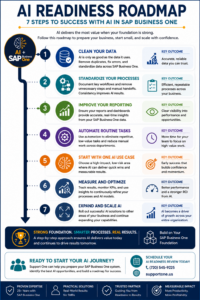
Follow this seven-step AI Readiness Roadmap to prepare your SAP Business One system for AI. Learn how clean data, standardized processes, automation, and continuous improvement create a strong foundation for successful AI adoption.
Getting Started with AI for SAP Business One
Artificial intelligence is evolving rapidly, but successful companies aren’t waiting for the “perfect” AI solution. They’re taking practical steps today to improve productivity, make better decisions, and get more value from their ERP investment.
If you’re using SAP Business One, now is the ideal time to evaluate how prepared your business is for AI. In many cases, the biggest opportunities don’t require replacing your ERP—they begin with cleaner data, better processes, improved reporting, and a clear roadmap for applying AI where it delivers measurable business value.
At Support One, we’ve spent more than 25 years helping manufacturers and distributors maximize their SAP Business One investment. We understand that every business is different, which is why we focus on practical solutions that align with your goals—not technology for technology’s sake. See Why Business are Choosing Support One.
Whether you’re exploring AI for the first time or looking to expand your current capabilities, our team can help you identify high-impact opportunities, strengthen your ERP foundation, and build a realistic AI strategy for the future.
Take the First Step
Schedule a complimentary AI Readiness Review with one of our SAP Business One consultants.
Together, we’ll help you:
- Evaluate whether your SAP Business One system is ready for AI
- Identify practical AI opportunities with the fastest return on investment
- Review your data quality and reporting capabilities
- Discuss automation and integration opportunities
- Develop a roadmap that aligns with your business goals
The future of AI isn’t about replacing your ERP—it’s about unlocking more value from it.
Contact Support One today to schedule your complimentary AI Readiness Review and discover how practical AI can help your business work smarter, improve profitability, and stay ahead of the competition.

Questions about AI for Business One? Let’s talk.

